
Migration Cutover Plan: How to Reduce Downtime, Errors, and Business Exposure

Enterprise ecommerce migrations create pressure long before any single technical task fails. Customers still need to pay, inventory still has to stay trustworthy, orders still need to reach ERP, and support teams need clear answers before a small defect becomes a business problem.
A migration cutover plan matters because it turns that pressure into a controlled transition window. The cutover is the live period when traffic, data, integrations, or business operations move from one state to another. If the plan treats that window as a switch, the business inherits every hidden dependency at once. If it treats the window as a controlled business event, the team knows which flows must stay protected, what level of interruption is acceptable, who can make go/no-go decisions, and when to roll back or fix forward.
That is the practical value of a migration cutover plan: it helps teams see where downtime, data errors, or rollback confusion can become revenue loss, delayed fulfillment, customer frustration, or support overload. Drawing on Expert Soft’s ecommerce migration work, this article shows how to define the controls, evidence, and decision paths that keep go-live manageable before, during, and after the live window.
Quick Tips for Busy People
If you only have a few minutes, keep these cutover truths close:
- Business exposure comes first: define which customer and operational flows can damage revenue, fulfillment, support, or trust if they fail during the live window.
- Plan components should create control: connect scope, timing, owners, dependencies, freezes, validation, and recovery rules so decisions are possible under pressure.
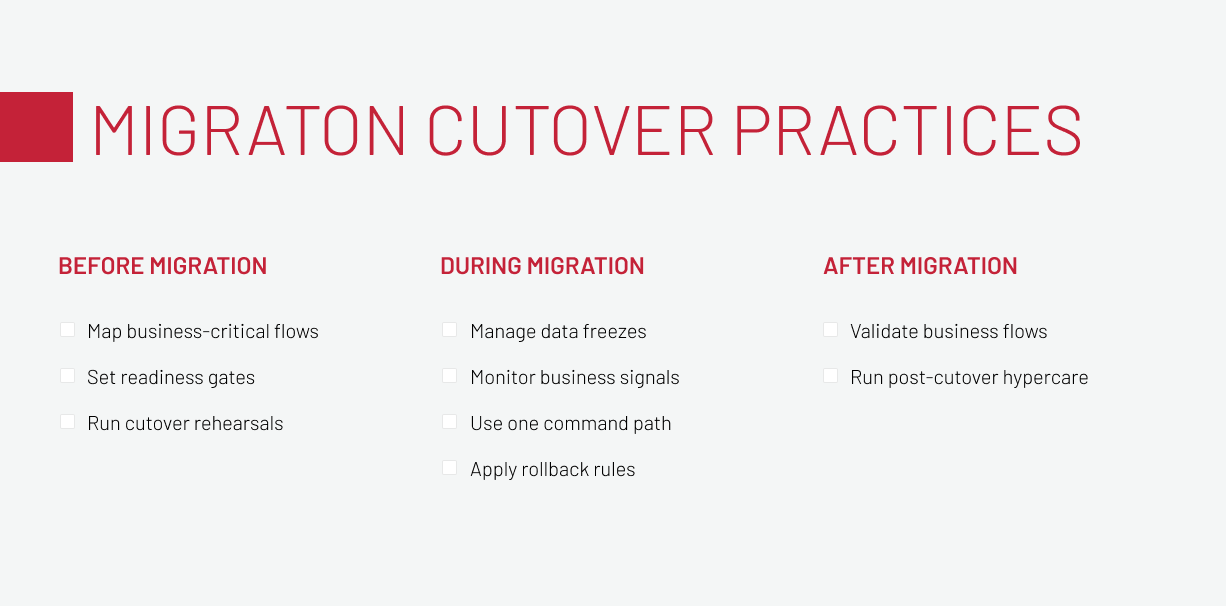
- Before migration, map workflows instead of systems: follow how an order moves through discovery, checkout, payment, fulfillment, and support, then tie platform dependencies to the moments where they can interrupt that path.
- Before migration, turn readiness into evidence: use gates and rehearsals to prove that critical flows, data states, integrations, owners, and rollback paths are ready before production timing begins.
- During migration, monitor business signals: infrastructure health is not enough if checkout, payments, order sync, imports, or support patterns show the business is blocked.
- During migration, apply recovery rules early: rollback or fix-forward decisions should follow business-impact thresholds agreed before the live window.
- After migration, prove stability with real use: production traffic, integrations, support patterns, and operational work show whether the migrated platform is ready for normal mode.
The sections below turn those points into a practical before, during, and after model for migration cutover planning.
Why Migration Cutover Planning Starts With Business Exposure
Cutover planning starts with exposure because go-live risk is defined by what the business cannot afford to lose, not by what the technical team has scheduled. The team needs to know which customer and operational flows would create damage if they slowed down, broke, or became unclear during the live window.
A migration cutover plan reduces that exposure when it defines business-critical flows, readiness gates, live-control signals, rollback authority, and post-cutover validation before go-live. That sentence sounds simple because the failure pattern is painfully familiar: the technical plan is detailed, the business tolerance is vague, and the first real problem appears where nobody assigned decision authority.
Business exposure appears when a technical delay interrupts the commercial path customers and operations rely on. In ecommerce, one weak dependency can quietly break the chain between what shoppers see, how they pay, how orders move into ERP, and how support explains the situation. The business problem is not only the defect itself, but the confusion it creates when teams cannot tell whether revenue, fulfillment, or customer trust is already at risk.
Recent outage research shows why process discipline matters. In Uptime Institute’s Annual Outage Analysis 2026, 57% of respondents said their most recent major outage cost more than $100,000, and one in five reported costs above $1 million. The report also points to failures to follow established procedures as the leading driver of human error-related outages. A cutover plan will not remove every risk, but it can remove a very expensive category: people improvising under pressure because the decision path was never made operational.
This is why migration cutover planning starts earlier than the final weekend. If exposure is clear first, the next question becomes practical: which controls must the plan contain so the business can use it when pressure starts?
To connect cutover planning with the wider migration risk picture, read Expert Soft’s guide to data and cloud migration risks.
What a Migration Cutover Plan Should Contain
A useful migration cutover plan is not a heroic spreadsheet with everyone hoping the last row goes green. It is a control system for business-critical flows during a high-risk transition. At minimum, it should contain these components:
-

Scope:
keep the cutover window tied to the systems, storefronts, integrations, data entities, markets, and business flows that can affect continuity.
-

Timing:
freeze periods, full and delta loads, validation slots, communication cadence, and decision deadlines need a shared clock before the live window starts.
-

Owners:
technical leads, business owners, integration owners, support contacts, and the go/no-go authority should be visible before pressure turns ownership into a search.
-

Dependencies:
ERP, payment, product information, search, CMS, tax, CRM, logistics, imports, scheduled jobs, queues, and reporting paths can widen one defect when their connections are unclear.
-

Freezes:
Records, configuration, content, catalog updates, orders, and operational changes need explicit pause or read-only rules so business teams know what they can still do.
-

Validation:
orders, payments, inventory, pricing, catalog, search, customer accounts, documents, imports, reconciliation, and reporting have to prove usability, not merely deployment.
-

Recovery:
rollback and fix-forward criteria, decision authority, snapshots, restore points, routing controls, support coverage, and monitoring give the team options before pressure narrows judgment.
Those components turn a data migration cutover plan from a checklist into a decision model. Recovery time objective (RTO), recovery point objective (RPO), and service level agreement (SLA) expectations belong here as practical inputs, not as theory.
Recovery time objective defines how long the business can tolerate interruption. Recovery point objective defines how much data loss or delay is acceptable. Service level agreement expectations show where customer, partner, or internal commitments create hard limits. Together, they help decide what interruption the business can accept, who can accept risk if reconciliation misses a threshold, and what customer-facing flow triggers rollback rather than another hour of investigation.
Once these components are clear, preparation can move from document structure to the business-critical flows that must survive the cutover.
Before Migration: Build the Cutover Around Business-Critical Flows
Cutover preparation is not generic migration preparation with a different label. It is the work of making the upcoming live window safe enough to operate. The question is not only, “Are the technical tasks ready?” It is, “Can the business still function if this dependency behaves differently than expected?” The practices below help answer this question.
Map business-critical flows
Start by mapping customer and operational journeys, not systems in isolation. In ecommerce, follow the path from product discovery to checkout, payment, order creation, fulfillment, and support. Then connect catalog, pricing, inventory, and reporting to the moments where they can interrupt that path.
The reason is blunt: a technically successful migration can still fail the business. The database may be moved, the storefront may load, and the infrastructure dashboard may look calm while catalog indexing lags, a payment response times out, or order documents stop generating for the back-office. That is why dependency mapping needs to follow the order, not just the architecture diagram.
This workflow-chain mapping pattern is clear in Expert Soft’s SAP Commerce Cloud migration for a medical retailer. The team migrated the ecommerce system from .NET to SAP Commerce Cloud, where cutover exposure depended on more than the storefront going live. Inventory updates, NestPay payment processing, SAP S/4HANA order sync, Cloud Hot Folders, and order-document automation had to be treated as connected checkpoints in the order path.
The case shows why business-critical flow mapping matters: a customer-facing order can look successful while operations still lack the downstream evidence to process it confidently. If one checkpoint failed, customers could still place an order that operations could not confidently process.
Reliable ecommerce workflows during migration depend not only on a clean process, but on established system connections. Learn how to make your ecommerce system integration-ready.
Download the guideSet readiness gates
A readiness gate is a business and technical condition that must be true before go-live. It is not a ceremonial sign-off with nicer formatting.
Useful gates should prove the conditions that can stop or delay go-live, from accepted dependencies to tested validation scripts and agreed recovery rules. They also need real ownership: a missed threshold should already have a decision path, a communication route, and business owners who understand what that threshold means for launch.
This is where acceptable interruption and acceptable data state become operational. If a delta load is late, does the team wait, continue, or open a read-only period? If payment errors cross a threshold, who decides whether to roll back? If order sync is delayed but orders are safely queued, is that a fix-forward situation? The answers belong in the plan before anyone joins the live cutover call.
Run cutover rehearsals
A cutover rehearsal should prove that the plan works under realistic conditions. It should test timing, data volumes, integrations, owners, communication, validation, and recovery steps. If the dry run only proves that scripts can run in the right order, it has tested the easiest part of the cutover.
The rehearsal should expose a few high-value risks instead of producing a long list of observations nobody can use. Start with ownership, timing, data state, rollback thresholds, and communication gaps. Then turn each finding into a change in the live plan: a clearer owner, a longer validation slot, a stricter gate, or a different recovery path.
For legacy systems, rehearsal is often the first place where parallel operation and safeguard assumptions meet reality.
Use the rehearsal to test the moments where the live plan will need judgment, not only execution. For a storefront migration, that can mean confirming how traffic routing, fallback behavior, CMS access, search parity, and monitoring will be checked during the cutover, then turning every weak point into a clearer owner, threshold, or recovery step before production traffic moves.
SAP Commerce and cloud migrations add their own readiness questions around environment parity, integration checks, monitoring, and rollback options. Use the SAP Commerce migration playbook to plan those choices.
During Migration: Control the Live Cutover
During migration, the team has to operate within the controls it prepared. The live window is where freezes, signals, ownership, rollback rules, and communication paths either protect the business or reveal gaps.
The practical goal is speed with judgment. The team needs to detect business-impacting deviations early enough to choose a contained fix, a pause, a rollback, or a stakeholder update while options still exist.
Manage data freezes
Data freezes and read-only periods are business-state controls. They protect source and target data during cutover, but they also affect merchandisers, customer service, finance, fulfillment, and customers. If business teams discover a freeze only through symptoms, the cutover is already creating avoidable noise.
During the freeze, teams need a shared view of what is still allowed and what is temporarily blocked. Can customers still place orders? Are updates queued? Can business users change promotions? What happens to support actions that normally update account or order data? These answers reduce confusion because they connect the technical data state to the business behavior people will see.
Freezes protect the data state, but they do not prove that the data will still work for the business once it writes a resume. This is where data integrity during legacy system migration becomes relevant: teams should validate record counts together with business meaning, so prices calculate correctly, inventory supports fulfillment decisions, and order statuses trigger the expected downstream work.
Monitor business signals
Cutover dashboards should not stop at CPU, memory, database health, and deployment status. These metrics matter, but they can look fine while customers or operations are blocked somewhere more specific.
Focus first on signals that prove whether the platform still supports real commerce. Checkout and payment signals show whether customers can complete orders. Order sync, inventory, and import signals show whether operations can fulfill them. Search, catalog, pricing, and support signals show whether the storefront and service teams remain usable.
Every signal needs an owner and a threshold. A checkout failure chart without a decision rule is decoration. A queue-depth alert without an integration owner is just a louder form of waiting.
Use one command path
A command path is the live authority model for status, escalation, decisions, and stakeholder communication. It does not need to become a governance theater with twelve colored roles. It does need to prevent parallel decision-making.
The plan should name the go/no-go authority, technical leads, business owners, support lead, integration owners, and escalation route. It should define where status lives, how often updates are posted, which incidents require immediate escalation, and who communicates with business stakeholders.
This matters because cutover problems rarely respect org charts. A payment failure may involve checkout code, provider configuration, fraud settings, network behavior, support messaging, and executive tolerance. If every team starts solving its own slice without one command path, the cutover gets noisier exactly when it needs to get narrower.
Apply rollback rules
Rollback and fix-forward criteria become useful only when the team applies them during the live window. During the cutover call, the current evidence has to be compared with the agreed thresholds so the business decision is clear.
Use a small set of triggers people can recognize quickly. Roll back when a critical flow is unsafe, such as payment, order creation, data integrity, compliance reporting, or customer support. Fix forward when the affected flow is contained, data is safe, customers are not blocked, and the team has a validated correction path.
In Expert Soft’s work with a leading French cosmetics retailer, the migration from legacy JSP to Spartacus required rollback thinking before traffic moved, because the team needed ways to protect live ecommerce if the new storefront behavior failed.
Controlled coexistence gave that plan practical shape: parallel rollout limited how much traffic a front-end issue could affect, fallback logic created a route away from failed behavior, and CMS restrictions reduced the chance of content appearing in the wrong environment.
Expert Soft helps enterprise teams keep integrations and go-live controls aligned, so critical commerce workflows stay stable while the platform changes.
Talk to Our TeamThe point for rollback and fix-forward decisions is containment. When safeguards are designed into the migration, the team can isolate a problem and decide from evidence instead of being forced into an all-or-nothing launch.
After Migration: Prove Stability Under Real Business Load
Go-live is not proof. It is the first moment when the migrated platform has to hold under production behavior.
Post-cutover control protects trust and cost by catching problems while they are still containable. The team should stay in a controlled mode until the business can see that critical flows are stable, not just deployed.
Validate business flows
Validation after cutover should focus on production evidence, not on repeating the pre-go-live checklist. The team needs to confirm that real orders, real payment behavior, real inventory updates, and real ERP sync are stable under normal operating timing.
Reconciliation should explain mismatches quickly enough for the business to trust the new state. If checkout succeeds but confirmation emails fail, the customer experience is still broken. If inventory is synchronized but delayed beyond operational tolerance, the warehouse and support teams will discover the defect through workarounds.
In the medical retailer migration, post-cutover validation had to prove more than the fact that SAP Commerce Cloud was live. A successful order needed to move through real-time inventory, NestPay payment processing, SAP S/4HANA sync, Cloud Hot Folders, and automated documents without creating extra manual work for operations. That is the practical reason to validate workflow chains after go-live: silent breaks often appear where customer action turns into back-office processing.
Run post-cutover hypercare
Hypercare is controlled stabilization, not a vague support period with a hopeful name. It should define monitoring cadence, triage ownership, defect priority by business impact, stakeholder communication, and the moment temporary migration mechanisms can be retired.
During the first days and weeks, track the decisions and incidents that changed how the business operated. Pay special attention to crossed thresholds, recurring defects, support patterns, and any temporary workaround that should either become a formal procedure or be retired after stabilization. This record gives the team evidence for future migrations and helps the business understand what changed after go-live.
Hypercare should also close the loop with maintainability. If a temporary import path, feature flag, legacy sync, read-only mode, or manual reconciliation step remains active, someone must own its retirement. Otherwise, the migration ends with a new layer of operational debt wearing a temporary badge.
Together, these practices keep the migration from becoming a single tense go-live moment. The plan starts by defining exposure, turns readiness into evidence, uses live signals to guide decisions, and keeps validation active until the business can operate without special cutover support.
Final Word
A migration cutover plan is a business-control system, not a document artifact. It protects the cutover window by defining flows, signals, owners, gates, freezes, validation, and rollback rules before the business depends on them.
The before, during, and after structure matters. Before migration, the plan makes exposure visible and turns readiness into evidence. During migration, it gives the team one operating model for signals and decisions. After migration, it proves stability under real business load.
That is how a migration cutover plan reduces downtime, errors, rollback confusion, and business exposure. Not by making the cutover look tidy on paper, but by giving the business enough control to keep moving when the platform is changing underneath it.
New articles

See more

See more

See more

See more

See more