
Strategies for Scaling Search Performance for High-Traffic Ecommerce

The last thing you want in high-load ecommerce is thousands of users searching for products at the same time and either getting irrelevant site results or waiting so long that they simply leave. And when they leave, the revenue goes with them. The stakes are high: according to Constructor’s research, though only 24% of users interact with site search, they account for 44% of all ecommerce revenue. That’s why in enterprise projects we put a lot of attention into ensuring the site search layer delivers low latency, stability, and accuracy even under peak traffic.
Based on our experience, this article looks at what it takes for enterprise teams to build and maintain site search for ecommerce that stays fast and relevant at scale. We’ll break down the parameters that influence performance and what you can do, given your architecture and search engine choice, to keep site search resilient as catalogs grow and traffic spikes.
Quick Tips for Busy People
For a fast overview, the highlights below summarize the main ideas and outline what typically scales the on site search ecommerce uses.
- Architecture defines scaling boundaries: self-hosted, SaaS, and hybrid search models scale differently and require distinct operational commitments.
- Search models shape system load: exact, attribute-based, semantic, and contextual queries each introduce unique performance and resource demands.
- Indexing speed controls data freshness: incremental updates and clean document structure keep results current as catalogs and update rates grow.
- Monolithic patterns fail under load: oversized indexes, relational DB search, and poor normalization create early bottlenecks during traffic spikes.
- Workload separation improves stability: autocomplete, full-text, facets, and semantic retrieval scale more predictably on dedicated indexes.
- Caching smooths peak demand: edge and in-memory caching absorb repeated queries and flatten traffic surges.
- Search analytics guide ongoing tuning: metrics like latency, zero-results, CTR, and shard health reveal issues before users notice.
- Site search evolves in clear stages: stacks typically progress from MVP to production, then relevance tuning, semantic models, and geo-scaling.
If you want a deeper answer to the question: “How can I optimize my ecommerce site search without overhauling the entire stack?”, the sections below walk through each layer of the search system in detail.
Search Architecture Foundations for Scalability
How your ecommerce search strategy and architecture are implemented directly shapes how the search layer behaves as catalogs grow and traffic patterns change. For ecommerce platforms, this foundation decides how to remain responsive or collapse.
Self-hosted search engines
Self-hosted search gives full control over relevance, ML ranking, and business-logic integration, but it also means your team owns all scalability responsibilities. As catalogs grow and query load rises, you’re directly accountable for availability, failover, schema evolution, node orchestration, and capacity planning. Any weakness in sharding, replication, or balancing shows up immediately under peak traffic.
This model works for large, fast-changing catalogs or domain-specific scoring, but only if the team can manage the scaling burden. Growth isn’t just adding hardware: search performance depends on correct sharding aligned to business logic, strong replication topologies, and hot–warm–cold storage tiers that keep latency stable as data expands.
Caching layers such as Redis or Hazelcast help absorb repeated queries, and edge caching reduces burst pressure, but every layer must be configured, monitored, and tuned. In self-hosted environments, search scalability is an engineering responsibility end-to-end.
SaaS search platforms
On many modern ecommerce projects we currently see, Algolia is used as the primary search layer, alongside engines such as Search.io or Azure Cognitive Search. These SaaS engines provide scaling, replication, and high availability out of the box, which makes them a practical choice when clients need to launch new markets or product lines quickly without adding infrastructure or SRE effort.
In terms of scalability, this model often provides near-instant scaling and high availability. However, from our experience integrating these platforms, it’s not as effortless as it appears.
Performance still heavily depends on how the engineering team structures data, designs queries, and works within the provider’s SLAs, pricing model, and architectural constraints. As query-per-second (QPS) volume and index size grow, costs increase accordingly, while tuning options remain limited to configuration tools such as relevance controls, synonyms, analytics, and natural language processing (NLP) features.
Hybrid approaches
Hybrid architectures combine multiple search models so each layer scales according to its role. From what we’ve seen in enterprise environments, the common patterns are:
-

Self-hosted indexing + cloud semantic search
Complex queries stay local, while peak-traffic scaling for semantic workloads is offloaded to SaaS.
-

SaaS autocomplete + local cluster for heavy queries
High-QPS entry points scale elastically, and business-critical queries run on controlled infrastructure.
-

Approximate nearest neighbor (ANN) cluster for semantic search + BM25 for primary retrieval
Vector relevance scales independently, while the BM25 algorithm ranks results by how well each document matches the user’s query.
These combinations provide flexibility, but they also create a multi-layer scalability model. SaaS components scale automatically within vendor limits. Self-hosted search requires managed sharding and replication. ANN clusters must be sized and tuned based on embedding volume and query patterns. Failover, synchronization, and monitoring need tighter coordination because any layer can become the bottleneck.
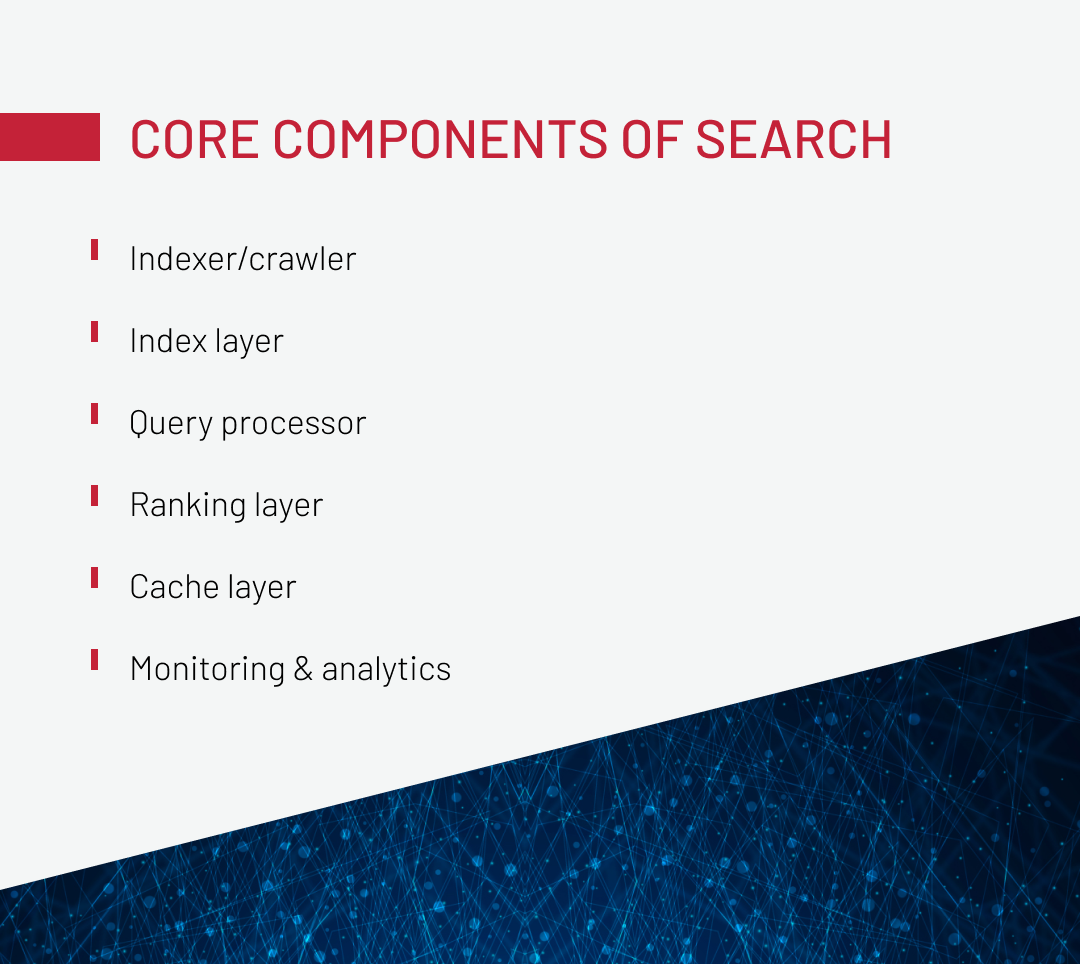
Core Components of a Scalable Search System
Scalable search functionality in ecommerce comes down to how well each part of the search stack can handle load on its own. If even one layer starts to lag, the whole experience slows down, especially as catalogs grow and traffic spikes become harder to predict. The sections below walk through how each layer behaves under production conditions and how it shapes both performance and business results.
Indexer/crawler
As the component responsible for pulling and updating product data, the indexer becomes one of the first places where scaling issues surface. When catalog size or update frequency grows, the indexer has to process more changes per second, and that load directly impacts how quickly search can reflect stock levels, price changes, or new SKUs.
The critical failure pattern appears when the indexer cannot keep up. The critical failure pattern appears when the indexer cannot keep up. When the system can’t keep up with updates, changes start piling up and indexing slows down. Users then see stale results, like out-of-stock items still showing up or new products taking far too long to appear. In high-traffic ecommerce, that hurts conversion and creates extra work for merchandising teams reacting to inaccurate listings.
Because full rebuilds become unrealistic as catalogs scale, systems must rely on incremental indexing. Even with incremental updates, poor batching, missing deduplication, or weak versioning can cause inconsistent states in the index. Under sustained load, backpressure mechanisms must prevent the indexer from overwhelming downstream components. Otherwise, the entire pipeline shifts from near real-time to reactive.
Index layer
The index layer is where scaling issues become structural. As data volume grows, this layer determines whether search maintains stable latency or hits hard performance limits. In most enterprise setups, bottlenecks appear when shard layout or document structure doesn’t reflect real traffic patterns, creating hot shards — a small number of partitions absorbing most queries while others stay idle.
When sharding and replication reflect real user behavior, the index layer scales cleanly as the catalog grows. When they do not, the system develops persistent latency spikes, uneven load distribution, and long-term limits that directly affect both performance and business outcomes.
Query processor
The query processor is one of the first components to show CPU pressure as catalogs grow and queries become more complex. High-traffic ecommerce workloads push the index layer to its limits because each search request triggers real-time lookups, scoring, and ranking that must execute immediately. Tokenization, filters, stemming, synonym expansion, fuzzy matching, and prefix logic all multiply CPU cost, especially when users combine multiple filters or search across large attribute sets.
Because the query processor transforms raw user input into a structured form that the search engine can execute, any slowdown here directly affects latency. When CPU saturation hits, autocomplete delays increase, filter refinements take longer, and users experience slow responses even if the index itself is well-optimized.
A scalable query layer must minimize unnecessary transformations, cache repeated query patterns, and keep expensive operations (like fuzzy matching or compound filters) under control. If this layer falls behind, the rest of the search stack cannot compensate, because the bottleneck appears before the engine ever touches the index.
Ranking layer
The ranking layer is where search quality directly impacts CTR, zero-result rates, and revenue, making it highly sensitive to accuracy and latency. Under load, it’s also a vulnerable component: BM25 is fast, but ML reranking, business rules, personalization, and contextual scoring add substantial compute cost. In large catalogs, this overhead grows quickly, and if ML functionality isn’t isolated from the main search path, it drives CPU spikes across all queries.
A scalable setup keeps boundaries strict: BM25 remains lightweight, ML reranking runs in separate pools, and semantic scoring is applied selectively. If ranking overloads, downstream caching, or sharding can’t compensate, the bottleneck appears after the index has completed its job.
Cache layer
Caching is the safety net that prevents the cluster from collapsing under peak load. When done right, it absorbs a massive percentage of repetitive queries, especially top categories, popular filters, and frequently accessed product variants.
Edge caching, combined with CDN distribution, pushes the load even further away from the search cluster. Meanwhile, in-memory systems like Redis handle hot queries with microsecond latency. This is the layer that keeps the platform stable during 10× traffic surges, seasonal demand, or marketing-driven flash peaks.
Caching must be tuned intentionally: what gets cached, for how long, and where (edge vs. application vs. in-engine) determines whether the system holds steady or starts dropping requests.
Many performance issues come from treating caching as isolated patches rather than part of a unified system. Download the whitepaper to see how to build caching that scales.
Monitoring & analytics
Search without analytics is essentially an unmonitored production experiment. It may work, but you’ll have no idea when it stops working or why.
A scalable search system tracks the metrics that reflect both system health and business outcomes:
Key signals to monitor:
- Query latency
- Zero-result ratio
- CTR and dwell time
- SERP exit rate
- Error distribution across nodes
- QPS distribution and spikes
- Shard health and resource usage
When you can’t see what’s happening inside your search stack, you can’t guide or scale it effectively. Analytics provide the insight needed to shape and optimize it.
Search Query Models That Shape Scalability Requirements
Different ecommerce search features introduce their own scaling behavior as catalogs expand and traffic patterns shift. Exact match, attribute-based filtering, semantic search, and contextual logic all place different kinds of pressure on the system, and those differences start to dictate how the search stack must grow, both technically and economically. Understanding these models makes it easier to plan an architecture that stays fast and consistent under real production load.
Exact match
Exact Match covers SKUs, product IDs, brand names, and other high-intent identifiers. Maintaining precision under load is the challenge: as more identifiers enter the catalog and queries per second (QPS) increase, Exact Match must remain predictable and fast.
To scale Exact Match effectively, teams rely on techniques such as:
- Dedicated keyword fields that keep identifiers clean
- N-gram indexing for prefix-based lookups
- Synonym tables for multi-lexeme representations (e.g., “A&F”, “Abercrombie & Fitch”)
The most common issues come from analyzers that alter the field in ways that break exact matching: overly aggressive tokenizers, lowercase filters applied to fields that must remain unchanged, or synonym rules that introduce extra terms and create false matches. These mistakes turn a precision-based lookup into a noisy search, and that creates direct revenue loss.
Attribute-based search
Attribute-based search is one of the heaviest loads in high-SKU ecommerce because every filter, such as category, brand, price, color, size, and compatibility, forces the system to compute and return aggregated counts in real time. As catalogs grow and users combine multiple facets, the number of attribute combinations explodes. When the index isn’t prepared for this workload, latency rises quickly, and the filter layer becomes the first part of the search to slow down under traffic spikes.
Performance issues usually appear when the system tries to calculate aggregations on the fly across large document sets. Without pre-aggregated facets or a separate Facet Index, each filter click triggers expensive scans, which immediately affects product discovery: users see slow or inconsistent filters, and high-traffic categories become unreliable during peak hours.
To keep attribute-heavy workloads scalable, teams normally rely on three core techniques:
- Pre-aggregated facets, which remove the need for real-time heavy aggregations.
- A dedicated Facet Index, isolating filtering from the main Search Index, so both layers scale independently.
- Caching for popular facet combinations, which absorbs repeated requests during traffic peaks.
When these measures are missing, attribute-based search becomes the earliest visible degradation point in the entire search stack, often long before ranking, parsing, or indexing show signs of stress.
Semantic search
Semantic search meaningfully improves how users reach products, reducing zero-result pages and increasing successful long-tail queries. It helps shoppers navigate large catalogs even when they don’t use the exact terms found in product data, which typically leads to better engagement and higher-quality interactions with the catalog.
It works by interpreting meaning rather than matching text literally. A relevant example comes from a financial research organization that needed a faster way for users to navigate thousands of proprietary research documents. The solution was an AI chatbot interface, but the key enabler underneath it was semantic retrieval. Instead of relying only on keyword matching, the system used semantic embeddings to interpret complex financial questions and map them to the right documents.
Our team integrated a third-party AI assistant and trained it on their internal research corpus. It could interpret natural-language questions semantically and retrieve precise insights across the entire library. This removed much of the manual filtering that keyword search required.
Scaling semantic search requires infrastructure designed for heavier compute workloads. Embedding models (E5, SBERT, LaBSE, GTE) generate vector representations, while ANN indexes such as FAISS, HNSW, or ScaNN retrieve results efficiently at scale. Because this process is computationally intensive, vector search typically runs on a separate ANN cluster with its own ranking pipeline that combines BM25 and vector scoring. This separation prevents resource contention with keyword search and increases operational costs, but it also delivers more relevant results and stronger conversion performance.
Get the whitepaper to explore the architecture behind it.
Contextual search
Contextual search has direct operational weight because every search result must respect customer data and attributes, such as region, permissions, customer segment, licensing status, or viewing and purchase history. These rules enforce business and compliance constraints. When these rules fail, users either see products they shouldn’t or can’t access items they legally need, both of which immediately affect conversion and regulatory posture.
In one of our medical-equipment projects, the search layer had to enforce strict eligibility rules. The same query needed to produce different, legally compliant results depending on the user’s country, professional role, and licensing status. To support this, we restructured the search pipeline so visibility logic ran before ranking, filtering restricted items early, and routing ineligible users toward permitted alternatives.
Architecturally, contextual search introduces an extra layer of load:
- user and segment data must refresh quickly,
- scoring must run under low latency,
- and distributed features and update pipelines must keep all nodes in sync.
This creates scaling pressure that grows with both catalog size and user variability. If the system falls behind on any of these steps, contextual behavior becomes inconsistent, slow, or impossible to debug.
To operate reliably at scale, contextual search typically relies on:
-
 A feature store
That provides up-to-date user and segment attributes for every request
-
 Low-latency scoring
That applies context-aware rules without blocking the query path
-
 Segment-level caching
To avoid recalculating visibility and eligibility rules on each request
Without this foundation, contextual search becomes unstable and quickly turns into a bottleneck as traffic or regulatory complexity grows.
Common Mistakes That Compromise Search Scalability
The search models above define how a system should scale, but in real environments, the real limits show up in the implementation. Even a strong ecommerce site search solution can run into bottlenecks when small configuration mistakes pile up under load.
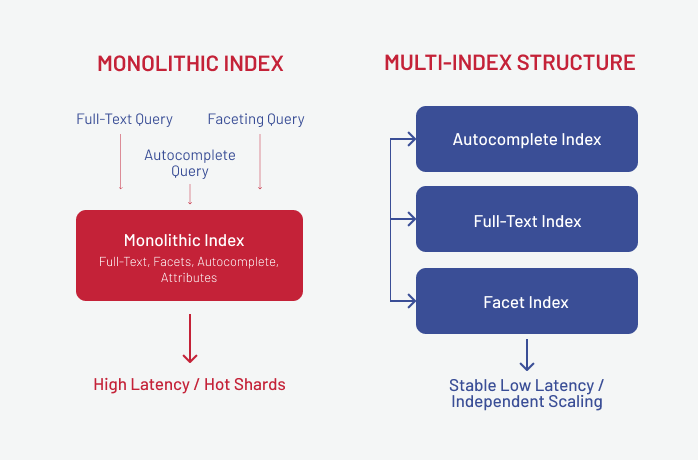
Monolithic index structures
A monolithic index, where the entire catalog, attributes, and all facets sit inside one oversized structure, is one of the fastest ways to break search scalability. When every query forces the engine to process huge documents, latency becomes unstable, rebuilds drag on, and peak traffic pushes the system beyond predictable limits.
Impact on the business:
Slow filters, delayed search results, and degraded product discovery directly reduce conversion, especially during high-demand periods when search load spikes.
Impact on the system:
Oversized documents create heavy I/O, increased memory pressure, and long GC pauses. In a monolithic index without real sharding, throughput becomes uneven because one oversized structure ends up handling every query, and it simply can’t keep up efficiently.
We saw a version of this in a telecommunications project where the index wasn’t technically monolithic, but the documents inside it had grown into “mini-monoliths.” Each Solr document was packed with large multi-facet payloads, so every filter request loaded far more data than the query needed. The result was indistinguishable from a true monolithic index: slow faceting, erratic latency under load, and performance cliffs during traffic spikes.
After we refactored those documents into smaller, atomic pieces aligned with the real product model, the index stopped dragging extra data into each query, retrieval times stabilized, and the system finally held up under peak load.
Using a relational database for search
There are ecommerce systems that still rely on relational databases for search, and at scale, this turns into a structural bottleneck. The same database has to handle both transactional workload and search queries, and as the catalog grows, everything starts to slow down, leading to higher latency, lock contention, and constant strain on overall database performance.
Impact on the business:
During peak traffic, pages load more slowly, site search starts to lag, and infrastructure costs climb because the database has to be oversized just to keep things running. Teams also lose the freedom to evolve search features, since every change risks disrupting the core transactional system the business depends on.
Impact on the system:
There’s no horizontal scaling, resource contention becomes chronic, and search degradation spills over into unrelated services that depend on the same database.
How it should be handled:
- A dedicated search engine (Elastic/OpenSearch/SaaS);
- denormalized documents tuned for fast retrieval;
- caching for filter-heavy and popular queries.
Missing text normalization
When search indexes store data “as is”: inconsistent casing, missing synonyms, no transliteration, the engine must do extra work attempting to match noisy input to noisy data. That reduces indexing efficiency, increases storage use, and weakens relevance.
Impact on the business:
Users fail to find products that exist in the catalog, zero search results increase, and search-driven conversions fall. Because the issue grows gradually, teams often miss the degradation until it becomes visible in revenue metrics.
Impact on the system:
The engine wastes CPU cycles trying to match inconsistent text, index build speeds slow down, and disk usage rises unnecessarily.
How it should be handled:
- Lowercasing and cleaning text;
- synonym dictionaries and query expansion;
- language-aware lemmatization and stemming;
- fuzzy matching for typos.
Incorrect sharding strategies
Sharding becomes a scaling mechanism only when it aligns with real traffic patterns. When shards are split randomly, for example, by document ID, load distribution becomes uneven. Some shards turn into hot spots while others remain nearly idle.
Impact on the business:
Site search becomes unpredictable. Response time varies dramatically between categories, infrastructure costs climb, and the site slows down during promotions or new product launches.
Impact on the system:
Hot shards cause unstable latency, higher timeout rates, and a higher risk of cascading performance failures as the dataset grows.
How it should be handled:
- Shard by meaningful business attributes (category, region, seller);
- rebalance periodically as the catalog grows;
- isolate high-load zones into separate clusters.
Are you thinking: “I want to add search to my ecommerce site or scale the one for peak traffic?” Our engineering team can help. Let’s talk through scalable, practical options.
Contact UsBest Practices for Building Scalable Search Systems
The issues above show where search systems usually start failing as load increases. This section outlines some of the best ways to improve ecommerce site search and keep performance stable under high load.
Use a multi-index search structure
With a decomposed index, each workload runs on its own optimized path: autocomplete on a lightweight high-QPS index, full-text on a CPU-scaled node set, semantic scoring on a vector store, and faceted filtering on a separate aggregation index. This separation keeps latency predictable under load and lets teams adjust relevance models or add new features without impacting other query types.
Apply a hot–warm–cold storage strategy
Site search performance often degrades not because of indexing or query logic, but because all data, both fresh and historical, sits on the same expensive, high-performance tier. When years of low-value, rarely accessed records share hardware with operational data, the system wastes I/O on documents that don’t need to be queried in real time. This increases retrieval latency, inflates storage costs, and makes the search layer harder to scale as the catalog grows.
A luxury retail client illustrated this pattern: historical order data was stored alongside active catalog records on fast SSD nodes, and once that volume crossed a threshold, both search queries and back-office tools slowed noticeably. Once we pulled older records out of the main dataset and moved them to a cold tier, performance recovered without adding hardware.
A hot–warm–cold setup avoids these bottlenecks by keeping the most frequently viewed items on fast nodes, storing less active data on cheaper but still responsive machines, and pushing long-tail or historical records into cold storage. For the business, this means steadier search performance during peak hours and lower infrastructure costs overall. For the system, it lowers I/O pressure, shortens recovery and rebuild times, and allows the search cluster to scale predictably instead of carrying unnecessary load.
Cache popular queries at the edge
Edge caching is one of the easiest ways to keep performance steady, because a small set of repeated queries usually drives most of the traffic. Serving those directly from the edge removes a big chunk of work from the back-end. With those high-frequency requests handled before they ever hit the search engine, the system keeps response times consistent even during peak load.
We applied this approach for a client in the telecom sector, where we applied the following caching strategy: combining custom caching with optimized Solr retrieval paths to reduce pressure on the back-end. Once the high-volume requests were handled at the edge, PDP response times improved by a factor of 8, and the system remained stable even during traffic spikes.
For the business, this keeps search fast during high-intent moments: fewer slowdowns on category pages, more stable PDP views, and lower abandonment when traffic surges.
Run A/B tests to validate relevance changes
What works in testing doesn’t always hold up once real users hit the system. Even small adjustments can shift user paths, influence click distribution, and alter conversion rates in ways logs won’t show directly.
A/B testing is a reliable way to measure the real impact of ranking changes before deploying them broadly. It prevents silent regressions and validates improvements with actual user behavior.
Implement autocomplete and query prediction
Autocomplete and query prediction help optimize site search functionality ecommerce teams rely on by shaping user intent before the full search pipeline is triggered. When users receive strong suggestions on the first keystroke, a large share of expensive full-text or semantic queries never hit the back-end. This reduces load on the index, smooths traffic spikes, and keeps the system predictable during peak hours.
We saw this in a consumer goods project where we integrated an AI-driven keyword recommendation component that surfaced high-value category terms and linked them to dedicated pages with dynamic filtering. By guiding users toward clearer, more structured queries, we reduced the number of ambiguous or inefficient requests flowing into the main search path. That lowered CPU pressure, cut unnecessary full-index scans, and made site search behavior more stable as traffic grew.
Applied consistently, these patterns create a search stack that stays fast and relevant as you grow, especially if your team is working on optimizing search performance at enterprise scale.
Roadmap for Evolving Search Capabilities
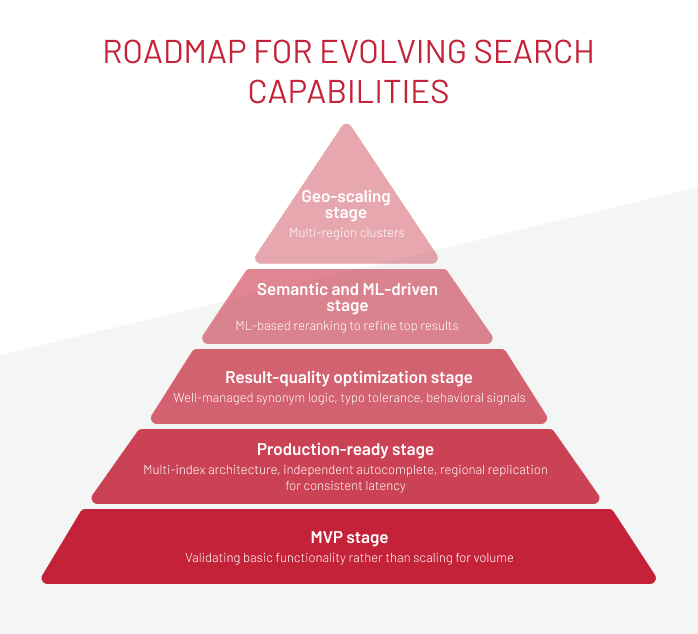
Search systems rarely jump from basic keyword matching to full ML-driven relevance in one step. In online stores of enterprise level, the evolution typically follows a predictable arc, with each stage addressing a different layer of scale, relevance, and operational maturity. Below is a structured path we often see in high-traffic environments, and the capabilities introduced at each level.
-
MVP stage
Teams begin by validating basic functionality rather than scaling for volume. The stack is deliberately minimal, typically a SaaS engine or a small Solr/OpenSearch cluster with straightforward BM25 scoring and limited search analytics focused on CTR and zero-result tracking. This stage reveals real query patterns and helps determine what must be built next.
-

Production-ready stage
As traffic increases and catalogs expand, the system needs stronger concurrency handling and more predictable performance. This phase usually introduces a multi-index architecture, independent autocomplete, regional replication for consistent latency, and text normalization to stabilize search behavior. At this point, the stack starts resembling infrastructure designed for real operational load, not experimentation.
-

Result-quality optimization stage
Once stability is achieved, focus shifts to improving how results are interpreted and ordered. Enhancements include well-managed synonym logic, typo tolerance, behavioral signals, and boosting rules for high-value categories and brands. These refinements reduce friction in product discovery and improve alignment between user intent and returned search results, directly influencing engagement and conversion.
-

Semantic and ML-driven stage
Here, site search evolves beyond literal text matching. Teams introduce semantic retrieval using vector representations, ML-based reranking to refine relevant search results, and context-aware scoring tuned to categories or user segments. This adds a deeper understanding of meaning and long-tail intent, enabling more accurate responses in large or complex catalogs. Some advanced capabilities for users, such as visual search, can be introduced in this stage as well.
-

Geo-scaling stage
When the platform expands into new regions or traffic becomes globally distributed, ecommerce site search must operate close to users. This stage adds multi-region clusters, low-latency replication strategies, and CDN-level edge caching to ensure consistent performance regardless of geography. The result is a globally reliable search experience under varied traffic patterns.
Overall, this roadmap makes it easier to see where your search stack really is and what’s worth improving next. It helps you pick the upgrades that actually move the needle, avoid scaling surprises, and keep site search feeling fast and reliable as both traffic and your catalog grow.
To Sum Up
Scaling ecommerce site search in high-load systems comes down to how well each part of your search stack handles growing traffic and expanding catalogs. The search stack has a lot of moving parts, such as engine choice, index structure, sharding, caching, semantic features, and contextual rules, and each one comes with its own limits. They also scale in very different ways.
We’ve also learned many times that there’s no magic fix — the biggest gains almost always come from the fundamentals: how the data is modeled, how it’s indexed, and how efficiently the engine can work with it. Most teams trying to optimize site search functionality in ecommerce see the biggest gains once these fundamentals are in order, long before they start adding new features.
If you’re looking at changes to your search setup: sharding, index layout, relevance tuning, or semantic layers, we can take a look at your current system, pinpoint where it’s hitting scaling limits, and recommend the steps that will make the most impact. Let’s discuss your needs.
New articles

See more

See more

See more

See more

See more