
Best Practices for Managing Large Product Catalogs in B2B Ecommerce

Managing a large B2B ecommerce product catalog is less about storing more SKUs and more about keeping control as complexity grows. Once a catalog spans multiple markets, languages, customer types, and tens of thousands of products, the challenge becomes performance, governance, findability, and operational speed.
According to the U.S. International Trade Administration, the global B2B ecommerce market is projected to reach $36 trillion in 2026. And as that volume grows, so does catalog size and complexity, making structured catalog management a prerequisite for keeping operations stable and scalable.
This article pulls together practices from our web ecommerce development services for enterprise projects across healthcare, telecom, and global distribution, covering the areas that cause the most friction in B2B catalog management at scale: catalog accessibility, lifecycle management, production workflows, multi-country complexity, and bulk change control. Not a checklist of abstract recommendations, but a look at what matters when the catalog stops being manageable by sheer willpower.
Quick Tips for Busy People
This article breaks down the key architectural and operational practices needed to manage your large B2B ecommerce catalog effectively at scale.
- Leverage the benefits of microservices for catalog management: don’t aim at restructuring the entire system at once, core operations can stay monolithic while isolated, high-change areas get extracted first.
- Catalog accessibility drives operational speed: building business-friendly management layers for non-technical teams can reduce IT dependency and eliminate human errors.
- Faceted navigation and variant handling are where catalog scale shows up first: how search storage is structured early has a disproportionate effect on later performance.
- Repeatable operations benefit most from standardization and reuse: attribute copying, saved views, and structured deactivation flows reduce overhead and keep quality consistent.
- The bottleneck is usually between raw supplier input and a publish-ready card: treating that gap as a structured production process reduces time-to-publish and improves consistency.
- Performance issues start in the data model: optimize structures and clean auxiliary data before scaling infrastructure to prevent hidden slowdowns.
- Multi-country catalogs multiply complexity: isolate regional logic, enforce visibility rules, and design localization fallback to maintain control across markets.
- Bulk updates require control layers: introduce pre-production validation and approval flows to make large-scale changes safe and repeatable.
What follows looks at how these dynamics play out in real systems.
Catalog Architecture for B2B Ecommerce
Before getting into the practice areas, a word on architecture, because it shapes what’s even possible operationally.
Across the enterprise ecommerce systems we work with, microservices architecture is becoming the default direction. The architecture brings its benefits: independent deployment, better fault isolation, and the ability to scale specific parts of the system without touching everything else.
That said, in practice, enterprises rarely flip the switch all at once. What we see more often is a hybrid approach. One of our architects put it this way:
"Most enterprise teams do not need full catalog decomposition at once. The more practical approach is selective decomposition: keep the catalog in the core platform if it's not becoming a bottleneck, and extract only the parts that genuinely warrant independence: search and faceted navigation, pricing and promotions logic, bulk sync pipelines, localization services."
A catalog capability should move out of the core platform when it scales differently, changes faster, or needs independent deployment.
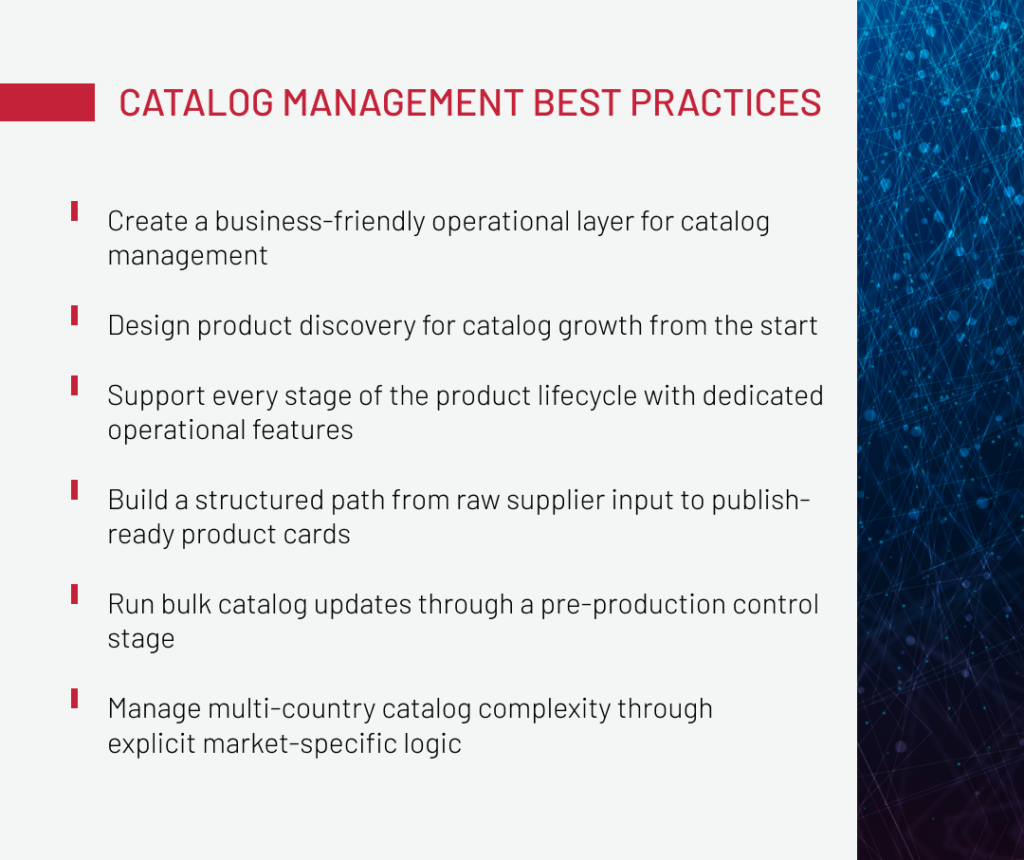
With this important note, which can already be counted as our first best practice, let’s move to the seven operational areas (and some tips for them), where large catalog management most often runs into trouble: from accessibility and findability to bulk change control and multi-country complexity.
Our deep-dive whitepaper covers the structural decisions that keep large catalogs consistent across systems as they grow.
Download the whitepaperCatalog Management Accessibility
Scaling a large catalog is an operational challenge as much as a data challenge. At enterprise scale, catalog performance depends not only on architecture, but also on who can make routine changes, how quickly they can do it, and how safely those changes can be made.
If making routine catalog changes, such as updating attributes, adjusting product statuses, editing category assignments, requires a developer or a platform specialist with deep backoffice knowledge, operational teams lose the ability to move independently. In enterprise B2B environments, where catalogs are in motion and business teams need to act without waiting for IT, this becomes a serious constraint. Changes start piling up, small errors creep in, and costs gradually add up.
Where the backoffice is too technical for day-to-day catalog operations, building a purpose-built layer for operational users is often the more practical fix than reworking the platform itself.
We applied this on a project for a global medical technology company. The existing backoffice was technically capable, but operationally inaccessible for catalog teams: too complex, too slow for routine work, and requiring specialist knowledge for tasks that should have been self-service. We built a custom management layer that made catalog operations: updating products, managing attributes, handling statuses, accessible to non-technical users without stripping away the controls that mattered.
Besides the convenience provided for catalog teams, this layer reduced the operational dependency on technical resources for day-to-day catalog work. The intuitive interface of the layer also enables faster onboarding of new team members , eliminating the need for deep tech understanding.
This is the broader practice: don’t treat catalog accessibility as a UI preference. Treat it as an architectural decision about who can run the catalog, how fast, and with what risk of error.
We’ve done it across retail, healthcare, telecom, and manufacturing — happy to talk through your setup.
Get in TouchCatalog Findability at Scale
As large catalogs grow, findability usually breaks first in filters, variant evaluation, and discovery-layer performance. The pattern is predictable: more attributes, more combinations, and more navigation logic gradually turn ecommerce online catalog discovery into both a UX problem and an infrastructure problem.
Prevent filters from collapsing under catalog complexity
Filter logic tends to be the area where catalog growth becomes a visible problem. The typical failure pattern: as the catalog scales, filter combinations multiply, and the underlying storage layer hits limits that only emerge at higher catalog volumes.
On a platform project for a major telecommunications provider, category pages were experiencing significant performance issues specifically because of faceted search. The underlying Solr storage was structured inefficiently: product data was consolidated into oversized documents, meaning every filter interaction triggered retrieval of far more data than needed, leading to slow responses and degraded UX.
The fix required restructuring how Solr stored this data, splitting large documents into smaller, purpose-specific ones to eliminate excessive data loading. And the result was a meaningful reduction in response times and a smoother experience on category pages.
The underlying practice: faceted navigation needs to be designed with catalog growth in mind from the start. The performance implications of search architecture deserve attention well before the catalog reaches that scale.
Keep variant-heavy catalogs easy to evaluate
Variant-heavy catalogs become hard to use when evaluating options takes too long or demands too much effort from the buyer. Large catalogs fail because choosing between them becomes cognitively expensive as there are too many options, too much ambiguity, and too little context.
On the same telecom project, the PDP was struggling with performance issues that standard caching couldn’t fully address. The team introduced custom caching at the component level and, in a somewhat unconventional move, applied Solr to the PDP, typically reserved for category and search pages, to accelerate variant information retrieval. Combined with Flexible Search query optimization, the result was an 8x improvement in PDP load time.
The practice here is broader than the technical implementation: treat variant complexity as a UX and performance concern simultaneously. Fast-loading variant data is part of making the evaluation feel manageable.
Audit discovery journeys for hidden performance load
Discovery pages, such as category listings, search results, and filters, tend to get heavier over time because of small additions that build up: new components being introduced, banners staying longer than they should, or navigation gradually expanding. Over time, these changes start to affect both how quickly pages load and how easy they are to use.
Periodic audits of catalog-facing UI logic, not just back-end infrastructure, are worth treating as a standard maintenance practice. Outdated rendering logic, redundant components, and over-engineered navigation patterns are common sources of both performance degradation and user experience friction. The catalog-facing layer is not exempt from technical debt just because it lives at the front-end.
Lifecycle Support for Large Catalogs
Large B2B catalogs need lifecycle tooling that supports every stage of change, from product creation and duplication to status updates and retirement. Once catalogs span multiple markets, categories, and systems, relying on a generic backoffice for every step creates friction fast.
The following practices were implemented as features within the custom backoffice layer described earlier. These are operational capabilities that address specific friction points across the product lifecycle.
-

Reuse existing product data instead of recreating it from scratch
Before new level implementation, catalog teams were manually recreating product entries that shared most of their attributes with existing ones — pure repetitive overhead. We built an attribute-copying feature that carries field values from an existing product into a new one, so teams start from a populated template rather than a blank card. It cut setup time for structurally similar products and reduced the inconsistencies that tend to creep in when the same data is entered multiple times by different people.
-

Give teams shortcuts for working with frequently used product subsets
While the new backoffice layer provides info about all products and categories available in the catalog, not all of them are needed for teams, as each team works with a specific category. To remove unnecessary overhead, we built saved filter sets and persistent working views so teams could return to their working context without rebuilding it each session. The practical effect was faster daily operations and fewer cases of actions being applied to the wrong product scope.
-

Make product changes visible
When something changes in a large catalog, finding out what changed, when, and by whom shouldn't require a support ticket. We implemented product-level change history so teams had direct visibility into the edit trail without leaving the management layer. In an environment where multiple people touch the same catalog entries across markets, this turned a recurring diagnostic problem into a non-issue.
-

Turn product retirement into a controlled workflow
Deactivating a product in a large B2B catalog often touches more than one place: listings, bundles, promotional logic, and regional availability. We built a structured deactivation flow that handles dependent impacts as part of the same action, rather than leaving teams to work through a manual sequence across different parts of the backoffice. For high-volume catalog operations, removing that class of errors matters.
Catalog Production Workflows
For most enterprise B2B teams, the part of catalog management that consumes the most day-to-day effort is getting product data from raw supplier input to a publishable state.
In many enterprise setups, supplier data arrives technically complete but not publish-ready: incomplete or inconsistent attributes, descriptions that don’t meet category standards, values that conflict with regional rules. When the gap between raw input and publishable output is closed manually, it becomes the slowest part of the entire catalog operation.
The underlying practice is to treat the path from raw supplier input to a published product card as a structured production workflow, not an ad-hoc editing task. A production flow that handles this well typically covers some combination of:
- Attribute extraction and normalization against category taxonomies
- Validation against regional and business rules before any human review
- Routing of uncertain or incomplete cases to the appropriate reviewer
- Controlled content generation from approved, validated attributes
- Governed sync back into PIM once output is approved
Catalog AI Studio is a production AI layer we’ve built to address exactly this kind of bottleneck. It takes raw supplier content, like feeds, CSVs, PIM exports, and runs it through a structured pipeline: extracting and normalizing attributes, validating against category and regional rules, routing uncertain cases to human review, and generating titles, descriptions, and bullets from approved attributes and brand templates. Changes don’t go directly to production. Everything moves through drafts and diff-based patches, with a full audit trail and rollback.
The practical outcome is a shorter path from raw supplier input to a publish-ready product card, without scaling the manual review work proportionally. Teams handle only the cases that genuinely need human judgment, while everything else moves automatically.
Performance under Catalog Growth
Large catalog performance problems usually start long before page speed becomes a visible issue. In most cases, the real causes sit upstream in the data model, auxiliary data buildup, and workloads that still run inside the core platform when they should have been moved out.
This section covers the structural practices that keep a large product catalog ecommerce uses performing well as it grows.
Reduce data-model weight before scaling infrastructure
The temptation when performance starts degrading is to scale infrastructure. More compute, more cache, more capacity. It’s the fast answer. It’s also often the wrong first move.
On a project for a global medical technology enterprise, the platform was generating an excessive number of database requests. The root cause was a data model that applied localized attribute structures to data that didn’t require localization. Every request was carrying localization overhead that served no actual purpose, and it was multiplying query counts significantly.
The solution was a targeted model redesign: replacing localized attributes with non-localized ones for fields that didn’t need localization. The result was a reduction in database requests of up to 100x, with corresponding improvements in memory usage and response time.
-

The practice:
before scaling infrastructure to accommodate a growing catalog, audit the data model for structural inefficiencies. Localization configurations, attribute inheritance, and relationship structures are common sources of unnecessary query weight.
Clean up catalog-adjacent data before it slows the platform down
Catalog performance doesn’t depend only on product records. It also depends on the data that accumulates around them: recently viewed products, user interaction logs, abandoned carts, technical processing artifacts, and other auxiliary records that accrue over time and are rarely prioritized for cleanup.
On the same enterprise project, millions of unpurged records of customers’ last-viewed products were creating significant database clutter and slowing query execution across the platform. The fix was an automated cleanup process that purged outdated records on a scheduled basis. But the performance impact was substantial: reduced database size, faster queries, and eliminated a category of slowdown that had been growing invisibly for a long time.
-
The practice:
treat catalog-adjacent data with the same operational discipline as the catalog itself. Without automated cleanup for auxiliary records, the database accumulates dead weight that degrades performance independent of catalog growth.
Protect the core platform from heavy but low-change workloads
Not all catalog-related workloads belong inside the core ecommerce platform. Some tasks, like reporting-heavy operations, export pipelines, integration processing, and static data aggregations, are resource-intensive but don’t require the real-time responsiveness of the core platform. Running them inside the core unnecessarily increases the load on a layer that needs to stay responsive for users.
-
The practice:
identify workloads that are heavy in compute or data volume but low in change frequency or real-time criticality, and route them to separate processing contexts. This isn't full microservices decomposition. It's targeted offloading that keeps the core platform from competing with its own background work.
Multi-Country Catalog Management
In enterprise B2B, the catalog rarely exists as a single unified entity. It lives in the context of multiple markets, each with its own language requirements, product availability rules, customer type access logic, and regional compliance constraints. As companies expand geographically, catalog complexity multiplies.
The practices here aren’t about internationalizing a product page. They’re about maintaining operational control when the same catalog underpins multiple market experiences simultaneously.
-
Design localization fallback as infrastructure, not an afterthought
When a product listing doesn't have a translation for the requested locale, the behavior depends on whether fallback logic was explicitly built in. Without it, the result is often inconsistent across markets. For a retail and distribution client operating in multilingual markets (including regions like Canada with multiple official languages), missing translations were creating inconsistent product listings and degraded UX for specific markets. The solution was a custom indexing provider implemented during the Solr indexing phase that falls back to the default language gracefully when a required locale value is absent.
-
Isolate market-specific catalog logic as the business grows into new territories
New countries bring new attribute sets, new category mappings, new sync configurations, and new access rules. If market-specific logic is woven into a shared catalog structure, adding a country becomes a platform modification. Isolating region-specific configuration, such as attributes, catalogs, rules, creates a cleaner separation that makes expansion an operational change, not a development project.
-
Control product visibility and purchasability by market explicitly
In enterprise B2B, the same product is not always available to the same customer in the same way across markets. On one project, products needed to be restricted by both geography and customer type — accessible to some users, but invisible or unpurchasable to others. The implementation combined access rules with smart redirects for unauthorized attempts, blocking restricted product links and routing unauthorized users to the appropriate landing point. Geographic and customer-type restrictions were enforced without degrading the experience for users in unrestricted segments.
Bulk Catalog Change Control
Mass updates to a large B2B product catalog are operationally necessary and operationally dangerous in equal measure. Attribute updates, price changes, content revisions, locale adjustments happen at scale regularly in enterprise B2B. And the typical process still looks like: prepare the batch, upload the file, watch things update in production.
One approach that helps is running bulk catalog updates through a pre-production control stage before anything touches production. Between preparing the batch and applying it, there should be a review layer where the team can see exactly what’s about to change, validate the batch against current catalog rules, assess the scope and risk of the update, and apply it deliberately, not automatically.
This isn’t about slowing down bulk operations. It’s about making them safe enough to run confidently at the frequency large catalogs require. Without this layer, teams either move slowly out of caution or move fast and break things. Neither is acceptable at enterprise scale.
PIM Sync & Bulk Ops Accelerator is a control layer that sits alongside an existing PIM or MDM without replacing it. The core mechanic is a dry-run simulation before anything is applied: the team gets a full diff at SKU, attribute, and locale level, sees exactly what will change, and can validate the batch against category rules, compliance checks, and required fields before execution.
An AI audit layer runs on top of that, flagging anomalies, near-duplicate SKUs, cross-market inconsistencies, and risk signals to make the review faster and more reliable. If something goes wrong after applying, rollback is built into the process, not treated as a last resort. The result is a shift from opaque batch operations to a predictable, traceable workflow with a full audit trail and no migrations required.
Bulk Catalog Change Control
There’s no single fix for large catalog management, which is exactly why lists of tips tend to fall flat for enterprise teams. The problems aren’t isolated. Findability depends on data model decisions. Performance depends on what you did with localization three years ago, while lifecycle efficiency depends on whether your backoffice layer was built for operators or for engineers.
What the practices above share is a common orientation: treating the catalog as an operational system, not just a data store. The catalog is infrastructure. Treating it that way: investing in the management layer, designing for growth before performance degrades, giving operational teams the tools to run it, is what separates catalogs that scale from ones that just get bigger.
If you’re facing ecommerce product catalog management challenges on a large B2B platform, we’re happy to take a look at what you’re dealing with and share what we’ve seen work.
Working with large B2B ecommerce platforms, Alex Bolshakova, Chief Strategist for Ecommerce Solutions at Expert Soft, brings a strategic perspective on managing complex product catalogs in ways that support usability, scalability, and long-term platform efficiency.
New articles

See more

See more

See more

See more

See more