
Strategies for Integrating AI in Software Development Without Losing Control

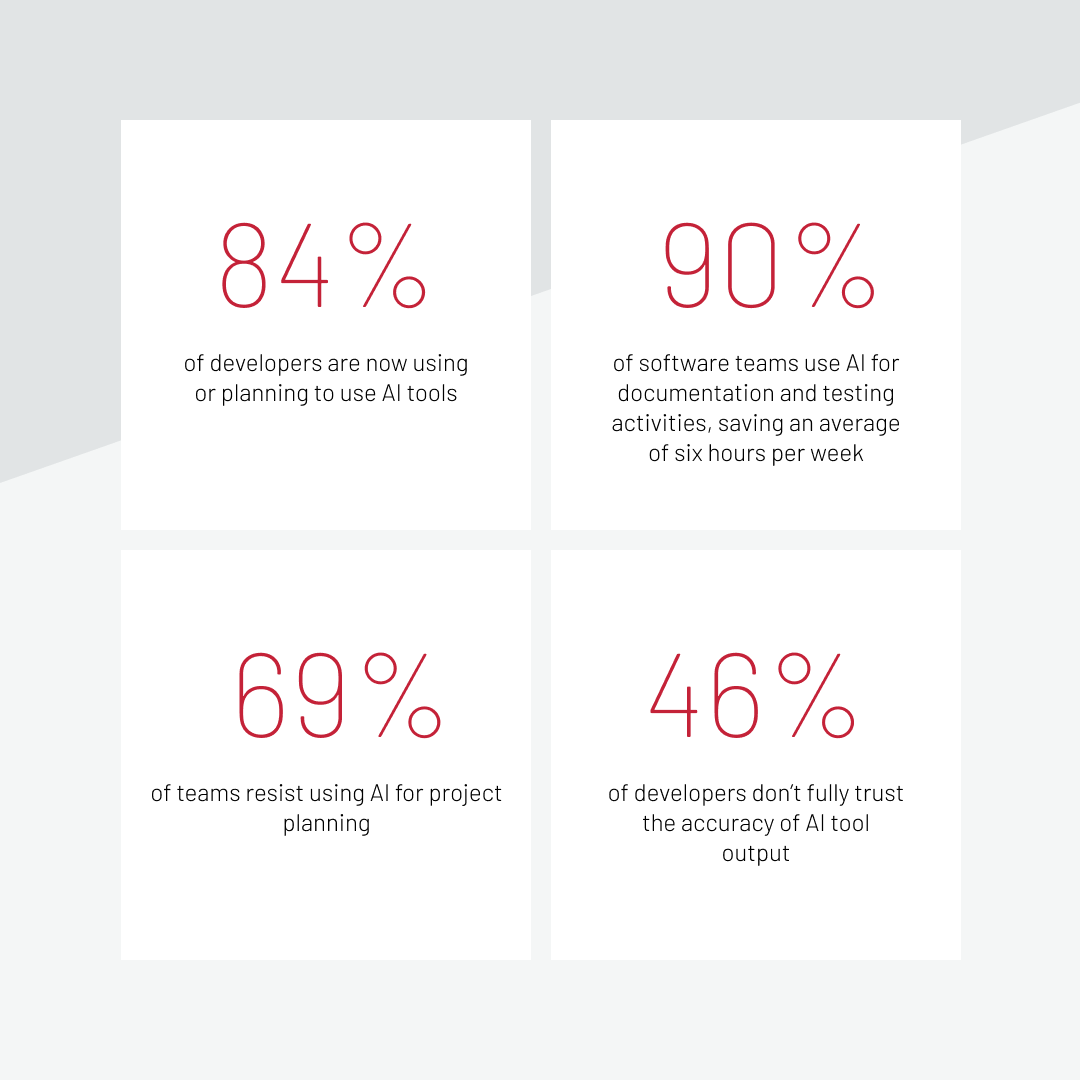
AI has already changed the daily rhythm of software development. 84% of developers are now using or planning to use AI tools to code faster, generate tests, navigate unfamiliar codebases, and summarize documents. What is still unresolved for technical leaders is how to introduce AI into delivery processes without weakening control over architecture, decision-making, and outcomes.
In short, AI can assist with coding, testing, and documentation, while ownership, accountability, and system integrity remain firmly human. In this article, we’ll look at strategies for integrating AI in software development that support these principles.
We’ll explore where responsibility must stay with the team, and how mature engineering organizations build an operating model around AI instead of layering tools onto existing workflows. The perspective comes from the experience of using AI on enterprise projects at Expert Soft, including where AI delivers measurable value and where it introduces risk if used without clear boundaries.
Quick Tips for Busy People
- AI’s strongest zone is repeatability: the most reliable productivity gains come from test generation, documentation drafts, boilerplate, and code summarization, not from areas that require architectural or domain judgment.
- Some decisions must stay human-owned: architecture, business-critical logic, security design, and incident accountability cannot be delegated to a tool, regardless of how capable AI tooling becomes.
- Review discipline increases after AI adoption, not decreases: “working” code and “maintainable” code are not the same thing, and the difference becomes more consequential as AI output volume grows.
- An operating model matters more than tool selection: the strategies for integrating AI in software development that hold up in practice require approved use cases, defined review gates, and prompt discipline established before you scale.
- Process maturity determines how much value you extract: disciplined engineering cultures get significantly more out of AI tooling, and weak practices get amplified.
- Architecture quality sets the ceiling for AI usefulness: in legacy and integration-heavy systems, unclear boundaries cause AI to surface existing inefficiencies rather than improve delivery.
- The best model is targeted, not universal: AI is applied where it adds measurable value, while human involvement remains essential in areas that require judgment and accountability.
At the system level, these effects translate into changes in workflow design and execution.
Where AI Helps in Software Development
The benefits of AI in software development are most reliable in areas with high repeatability, well-defined inputs, and reviewable outputs, such as boilerplate code generation, unit test drafting, or legacy code summarization. That does not cover the entire software development lifecycle (SDLC), but it covers more ground than most teams initially expect.
Planning and discovery
AI is genuinely useful at the early-pass stage of planning work. It can take raw inputs, such as meeting transcripts, Jira tickets, Confluence pages, stakeholder notes, and turn them into structured draft requirements. It can summarize lengthy discovery documents, flag missing fields in feature specs, and surface edge cases that initial discussions glossed over.
What it can’t do is validate those requirements against a real business context or make calls about scope and priority. AI shows what is already in the room. It doesn’t know what’s missing from the strategic picture, what the client hasn’t said yet, or which assumptions are load-bearing. These things remain conversations between people.
In the context of the AI software development process, treating AI as a first-pass assistant, not as a decision-maker at the discovery stage, is the distinction that keeps things useful.
Coding and refactoring
This is where most teams start, and where the productivity case for generative AI in software development is most visible. Scaffolding new modules, generating boilerplate, suggesting patterns for repetitive logic, parsing legacy code — AI handles them faster than most developers would manage manually. A large-scale field study from MIT, Harvard, and Microsoft found that developers with AI access completed 26% more tasks on average, with the strongest gains among junior and newer developers using AI for scaffolding and boilerplate.
Refactoring support is particularly underrated. AI can generate refactoring hypotheses for tangled code, propose cleaner structures, and help decompose monolithic functions. Although in practice we also see that without clear architectural guidance it often produces overly long and loosely structured code that still requires careful human validation.
AI can also accelerate deployment-adjacent tasks, like configuration generation, migration scripts, and changelogs.
Let’s look at an example. At Expert Soft, we work with a large enterprise organization operating a shared codebase across multiple business units, with a strict deployment process where changes in one unit can’t break downstream services. So much time was dedicated to reviewing the compatibility of the ready-for-deployment code with the existing codebase of all units.
To make the deployment process more efficient in that environment, we introduced an AI-powered tool that scans changes across multiple repositories and detects overlapping modifications between business units before downstream merges occur. For teams managing deployment time across shared codebases, this kind of proactive conflict detection is the difference between a smooth release and a late-stage integration crisis.
Code review and testing
Test case generation, draft unit tests, bug pattern detection, coverage gap analysis align well within current AI capabilities. In one of our projects, using GitHub Copilot for unit test generation reduced the time spent creating unit tests by approximately 60%.
The important nuance is that AI at the PR stage is advisory, not authoritative. It accelerates the first pass of review, helping reviewers focus on higher-order structural and logic concerns. But according to Stack Overflow’s 2025 Developer Survey, 46% of developers don’t trust the accuracy of AI tool output, and experienced developers are the most skeptical. That skepticism is well-placed. Teams that introduce AI-generated code into a review pipeline need to be more rigorous about review, not less, because submission volume can increase faster than review capacity scales.
Download our whitepaper to learn which structural decisions separate functional AI adoption from scalable AI integration.
Documentation and knowledge transfer
Documentation is one of the clearest wins in AI software engineering, particularly in long-lived enterprise systems where knowledge is distributed across teams, services, and years of architectural decisions.
AI can draft technical documentation, explain unfamiliar modules, summarize complex integrations, and help new team members get up to speed faster. According to McKinsey’s 2025 survey, more than 90% of software teams use AI for documentation and testing activities, saving an average of six hours per week.
One risk worth flagging explicitly: AI-assisted documentation is only as reliable as the source documentation and review process behind it. Teams that use AI to generate documentation carelessly and then use AI to work from that documentation create a feedback loop where inaccuracies accumulate. AI makes weak documentation weaker at scale.
Maintenance and optimization
A significant portion of engineering work involves maintenance, technical debt management, performance investigation, and system reliability. Usage of AI in software engineering fits well into it as a support layer.
These are the scenarios where AI earns its place:
- Incident investigation: correlating logs, summarizing error patterns, and generating root cause hypotheses for engineers to evaluate.
- Technical debt triage: identifying cleanup priorities across a codebase without requiring a manual audit of every corner of it.
- Performance profiling: interpreting profiling output and surfacing optimization candidates that would otherwise get deprioritized.
- Repetitive cleanup and operational data processing: automating initial categorization and analysis, freeing engineers for higher-judgment work.
What Should Stay Human-Owned When Using AI?
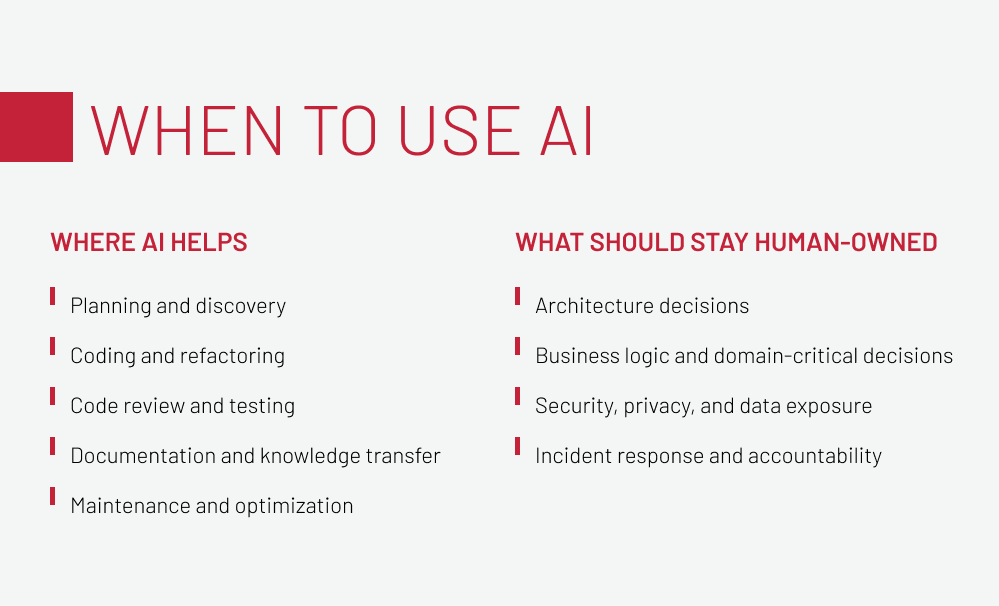
Four areas should stay under direct human ownership, regardless of how capable AI tooling becomes: architecture decisions, core business logic, security design, and incident accountability. This boundary is a practical part of how to use AI in software development responsibly.
According to Stack Overflow’s 2025 Developer Survey, 69% resist using AI for project planning. That reflects a practical view: when it comes to architecture decisions, core business logic, security design, and incident accountability, the cost of getting it wrong is still too high to fully hand over to a tool.
Architecture decisions
AI can generate architectural proposals, but it can’t evaluate whether those proposals are viable within the actual constraints of your system, where decisions are shaped by existing architecture, legacy behavior, undocumented contracts, and the long-term direction of the system.
AI doesn’t have that context. It generates plausible-sounding options that may be structurally incompatible with the real system. The role of an architect is to treat AI-generated inputs as one data point and then reason through feasibility, risk, and consequence with full awareness of what the system actually is.
Business logic and domain-critical decisions
Pricing rules, order flows, subscription access logic, compliance-sensitive workflows, country-specific behavior require domain nuance that AI regularly oversimplifies. The code it generates may be syntactically correct and functionally plausible while still being wrong in ways that are hard to catch without deep domain knowledge.
This is especially true in regulated industries and in ecommerce systems with complex permission hierarchies, multi-currency behavior, or tax logic. Ecommerce web development at the enterprise level involves exactly this kind of domain complexity, where a technically “working” implementation can still create serious downstream problems in pricing, order conversion, or compliance. The benefits of AI in these areas of software development are limited because human expertise is the control mechanism.
For a practical deep-dive into building AI-ready infrastructure in enterprise environments, get our whitepaper on AI-ready ecommerce data.
Security, privacy, and data exposure
Code that compiles and passes tests can still be insecure. Security-sensitive design requires thinking through not just how a solution functions but how it can be misused, abused, or exploited under real-world conditions. That reasoning can’t be delegated to a tool.
Prompt discipline matters too: sensitive system context shouldn’t be passed into AI tools without explicit data governance policies. We observe a growing tendency in teams to accept “working” solutions without sufficient scrutiny, and in security-adjacent features, that tendency carries disproportionate risk. AI produces confident-looking output regardless of whether the security implications have been thought through. The humans reviewing that output need to apply the skepticism that the tool can’t.
Incident response and accountability
AI can accelerate incident investigation: correlating data, generating hypotheses, summarizing impact. But it does not own incidents, and operational accountability cannot be delegated to a tool.
During an incident, the delivery team carries responsibility for decisions made under pressure: what to roll back, what to communicate, how to contain impact. AI can inform that process, but the ownership structure does not change.
Taking into account and acting on these boundaries requires a structure that holds up under real delivery pressure.
How to Adopt AI with Control
The strategies for integrating AI in software development that work are about an operating model, not tool selection. Here’s what that looks like:
-

Start with approved use cases, not tool enthusiasm
The first wave of AI adoption should focus on low-risk, high-repeatability tasks: test generation, documentation drafts, code summarization, boilerplate, repetitive coding support. These are areas where the output is easy to review and the failure modes are manageable.
-

Define review rules before scaling usage
Establish what always requires human approval, what can be AI-assisted but reviewed, and what can’t leave internal review at all. This becomes especially important in mixed teams and distributed delivery setups, where maintaining consistency and control is critical to reduce risks in high-load systems. When reviewing code in mixed teams, including contractors, we increasingly see a pattern of "dirty code" that is technically functional but does not meet internal standards. At scale, the accumulation of structurally weak output creates future refactoring overhead that teams absorb later.
-

Set boundaries for prompts, data, and repositories.
Sensitive data should not be included in prompts without explicit policy coverage, and developers should avoid uncontrolled shadow AI usage, because maintaining strict context discipline is a required part of the operating model.
-

Choose workflows before choosing metrics
Understand how AI fits into your existing delivery pipeline before deciding what to measure: where it reduces friction, where it creates new handoff points, or where the process breaks if AI is integrated poorly.
-
Measure what matters
Code quality, delivery speed, rework rate, review burden, and confidence in changes are better indicators than raw output volume. Speed is easy to see, but quality degradation takes longer to show up.
The framework above reflects principles. What follows in the next section is where those principles get tested.
What We See in Practice at Expert Soft
This section is about how AI works in ecommerce in practice, and what we see across enterprise projects.
Where AI starts creating risk
The patterns that create problems tend to follow a recognizable sequence:
- Generated code looks architecturally correct, but ignores real system constraints.
- Output is functionally plausible but structurally weak in ways that accumulate over time.
- Domain logic is simplified to something generic that works in isolation but fails at edge cases.
- Security implications aren’t flagged because the model’s confidence does not correlate with completeness.
- Teams trust the output too quickly because it looks polished.
- Context passed to the model is incomplete, but the output is still presented with apparent confidence.
However, none of these risks are reasons to avoid AI. These are reasons to build review discipline into the adoption model from day one, not as an afterthought once problems appear.
Why process maturity matters more than tools
AI adoption amplifies existing engineering culture. Disciplined teams benefit more. Teams with weak practices become more exposed to the consequences of those weaknesses.
This plays out consistently in practice: a team with clear coding standards, strong review culture, and well-defined architectural ownership gets significantly more out of AI tooling than a team treating it as a shortcut to skip the difficult parts. The tool does not compensate for structural weaknesses in the engineering process. It makes them more visible and more consequential.
The quality of AI output is also directly proportional to the quality and completeness of the context it is given. Garbage in, confident-sounding garbage out.
Why strong architecture makes AI more useful
AI works with what it’s given, and doesn’t optimize around constraints it’s not aware of. In legacy and integration-heavy enterprise systems, this means that AI is only as useful as the clarity of the system around it.
If the architecture is well-understood, well-documented, and under active governance, AI accelerates real work. If the system has unclear boundaries, inconsistent patterns, and poor documentation, AI amplifies the noise rather than improving delivery. All the inefficiencies that exist in the system become more visible.
If you are planning to introduce AI, start with your system’s foundation: architecture, processes, and data flow. Get in touch with the Expert Soft team to make it happen.
Talk to UsAI Rollout Model without Disrupting Delivery
For enterprise teams, how to use AI in software development should be treated as a rollout model, not a collection of individual experiments. The following four steps reflect what works when delivery continuity is non-negotiable.
Step 1. Identify the work AI can safely accelerate. Begin with areas where the scope is clear and the output is easy to verify, such as generating tests, drafting documentation, or handling repetitive code. Instead of leaving this to individual judgment, agree upfront on where AI is allowed to be used and where it is not.
Step 2. Add mandatory review and quality gates. Before scaling AI usage, establish the review structure:
- What always requires human approval?
- What goes through standard code review?
- What needs additional sign-off for security or business logic?
The gates come first, then the scale.
Step 3. Train teams on usage patterns, not just tool features. Training should cover prompt discipline, context management, review responsibility, and the specific cases where AI output requires elevated scrutiny.
Step 4. Expand only after you can measure real impact. Before moving AI into higher-risk areas of the SDLC, validate that current usage is delivering measurable improvement in outcomes that matter: quality, rework rate, review burden, delivery confidence. Expanding on the basis of perceived speed alone is how teams accumulate technical debt they didn’t plan for.
For teams working on enterprise ecommerce systems, this rollout approach connects directly to how you structure and coordinate development work overall.
Final Word
Teams that extract real value from AI share a few things in common: clear engineering processes, strong architectural foundations, and a consistent practice of keeping human judgment in the decisions that carry the most weight. The tooling is almost secondary.
What we see across enterprise projects is that AI adoption tends to reflect the organization behind it. Mature teams use it to accelerate work they already do well. That is where the benefits of AI in software development become most visible: faster execution, smoother reviews, and less time lost on repeatable work. Teams with weaker foundations produce more output faster and absorb the consequences later during code review, refactoring cycles, or incidents.
FAQ
-
How should teams use AI in software development responsibly?
Responsible AI use means keeping human judgment in decisions that carry real consequences: architecture, security, business logic, incident response, while letting AI accelerate the rest. The tool handles execution. People own accountability.
-
Which parts of software development can AI improve the most?
The benefits of AI in software development are strongest in high-repeatability tasks: unit test generation, boilerplate code, documentation drafting, code summarization, and first-pass review acceleration.
-
Can AI replace software developers?
No, because AI accelerates mechanical and repetitive work and cannot replace the judgment required for architecture decisions, domain-critical logic, security design, or incident response, all of which are central to enterprise delivery quality.
-
Where should human review remain mandatory when using AI?
Architecture decisions, business logic involving pricing or compliance, any security-adjacent code, and all incident response decisions must stay under direct human ownership, regardless of how polished the AI-generated output appears.
-
What guardrails should enterprises put in place before scaling AI tools?
Define approved use cases, set clear prompts and data governance policies, and establish mandatory review gates for AI output. Then train teams on system-specific usage patterns and measure what matters, like code quality and rework rate, not just speed, before expanding.
New articles

See more

See more

See more

See more

See more