
Data and Cloud Migration Risks: How to Ensure Performance and Business Continuity

Imagine this: you’re three days into cutover, dashboards are green, the QA team signed off, and you’re ready to call it a win. Monday morning, customers can’t check out. Your search indexing job that used to finish in an hour is now crawling past six, blocking catalog updates across three regions. Welcome to the reality of cloud migration, where “technical success” doesn’t always mean business continuity.
For CTOs and product owners, migration is an operational tightrope where one performance slip can freeze revenue. For solution architects, it’s where carefully mapped dependencies collide with cloud realities no lab test could predict. And when Uptime Institute’s analysis shows that over 60% of outages now cost at least $100,000 in total losses, while outages costing over $1 million jumped to 15%, the margin for error shrinks fast.
Through our migration services, we’ve seen what separates migrations that succeed from those that stall: knowing where performance falls apart and building the safeguards before risks surface. This guide walks through the risk map, the organizational and technical moves that work, and the metrics that tell you if your migration is actually holding up under real load.
Quick Tips for Busy People
A few points help frame what organizations should expect during migration:
- Strengthen organizational alignment before touching the tech: migrations stay predictable only when people, decisions, and expectations move in sync, while misalignment creates more failures than the cloud ever will.
- Clean up legacy constraints before moving workloads: if brittle logic and overloaded data models remain in place, the cloud will magnify every inefficiency, making stability impossible, no matter how much infrastructure you add.
- Revalidate integrations and caching for cloud behavior: cloud latency and distributed execution change how dependencies respond, so old assumptions break quickly unless integration paths and cache rules are rewritten for new runtime realities.
- Establish meaningful performance metrics and baselines early: without clear reference points, teams can’t tell if the system is improving or degrading, and real issues get lost in normal cloud variability.
- Monitor performance across every migration stage: problems surface at different phases of migration, so visibility has to follow the migration journey end-to-end to catch issues before customers feel them.
- Use a pre-migration checklist to eliminate unknowns: preparation is what turns migration from guesswork into controlled execution.
These patterns follow from how modern migrations are structured and where risk concentrates.
The Risk Map of Modern Migrations
Modern migrations disrupt far more than infrastructure. They push teams out of familiar on-premises routines and into a different way of operating, where cloud observability, autoscaling behavior, dependency mapping, and strict configuration parity matter much more. When this change is underestimated, data migration risks grow fast. Issues that were previously absorbed by powerful on-premises hardware or hidden inside tightly controlled networks start surfacing as slowdowns, unstable flows, and unexplainable discrepancies.
Many issues appear during the hybrid phase, when part of the platform runs in the cloud while the rest remains on legacy infrastructure. Mismatched assumptions cause real instability here. Background jobs collide with customer traffic. Integrations behave differently under cloud latency. Data structures expected by legacy services no longer align with what cloud components produce.
The sections below map the primary risks in cloud migration: performance risks first, then the structural and operational risks that threaten stability beyond performance alone.
If you want an expert view on your migration risks or architecture, contact our team. We’ll help you assess your current setup and outline safe next steps.
Let’s TalkPerformance risks during migration
Five performance risks consistently appear across enterprise migrations:
-

Noticeable slowdown of user-facing pages and actions
Cloud runtimes expose everything the on-premises environment used to mask: heavy assets, inefficient queries, oversized catalog structures, and deep dependency chains that slow down PDP, PLP, search, and checkout flows.
-

Longer processing times for core business operations
Order updates, pricing calculations, promotions, indexing, and data sync tasks slow down when legacy logic, bloated tables, and outdated indexing strategies hit distributed cloud storage.
-

Systems struggling with peak traffic or sudden load spikes
Techniques that worked on-premises, from manual caching to tuned SQL paths, don’t translate directly to the cloud. Under real traffic, inefficient logic and heavy operations consume shared resources faster than expected, causing queues to grow and the system to slow down during peak events.
-

Accumulation of delays in operational pipelines
Imports, indexing flows, cron jobs, and sync waves now share cloud resources with user traffic. What used to be “background noise” becomes a source of cascading delays.
-

Increased failure rates in user or system transactions
Cloud network variability and distributed execution introduce stricter timeout behavior, partial responses, and shifts in how third-party APIs react under load. These changes create chains of secondary effects, including more retries, more contention, and more inconsistent outcomes.
However, not all legacy system migration risks are tied to performance.
Non-performance migration risks that still impact stability
Structural, architectural, and organizational issues create failures even when throughput and latency are stable. These problems arise from inconsistencies in data, configuration, security, and team coordination, directly impacting system reliability.
-
1. Data integrity failures
During migration or coexistence, data can fall out of sync when structures, mappings, or processing rules differ between systems. Even small inconsistencies accumulate into incorrect search results, broken business rules, or errors in downstream services.
-
2. Architectural incompatibilities and migration blockers
Critical features or components break after migration due to incompatibility with the cloud architecture. Hardcoded paths, platform-dependent logic, and legacy shortcuts fail in cloud environments. Tight coupling in pricing logic, import logic, or integrations prevents rollout or scaling. Differences in staging versus production configuration create hidden blockers that appear only under live traffic.
-
3. Security gaps
Migrating to the cloud changes who handles security. The access controls, encryption, and audit trails you managed on-premises now need cloud-ready setups. When teams don’t update those controls for a distributed environment, sensitive data can end up exposed, compliance checks start failing, and the penalties follow quickly.
-
4. Going over budget
Migration budgets typically expand because cloud platforms surface inefficiencies that were invisible on-premises. Heavy imports, large data volumes, slow queries, and post-migration cleanup work consume more compute and storage than planned. Unaddressed legacy patterns force teams into extended stabilization cycles, raising both operational effort and cloud spend.
-
5. Teams not on the same page
When IT, operations, and business teams aren’t working toward the same goals, everything starts pulling apart. Decisions get made in isolation, ownership becomes blurred, and critical dependencies fall through the cracks. Without shared metrics, aligned expectations, and continuous cross-team communication, decisions get messy, and you end up with technical debt that’s hard to unwind later.
Not everything can be solved just with technical fixes. Migrations also need phased planning, clear ownership, and teams trained to handle cloud-specific behavior.
Organizational Measures to Minimize Migration Risks
Organizational decisions determine whether a migration runs in a predictable manner or produces instability across environments. Below are some tips you can rely on when planning migration.
-

Tip 1: Understand cloud vs. on-premises differences
Cloud environments operate under different assumptions than tightly controlled on-premises setups. Infrastructure is abstracted, network paths behave differently, and runtime behavior becomes more sensitive to inefficient code or heavy operations. These differences should shape how you plan migration steps, validate performance, and interpret system behavior during rollout.
-
Tip 2: Plan migration in waves
Migrations are far more predictable when delivered in structured waves. Each wave should have a clear scope, dependencies, and success criteria, reducing the blast radius of unexpected issues. This staged approach keeps changes manageable, allows faults to surface early, and supports long-term coexistence between cloud and legacy components.
-

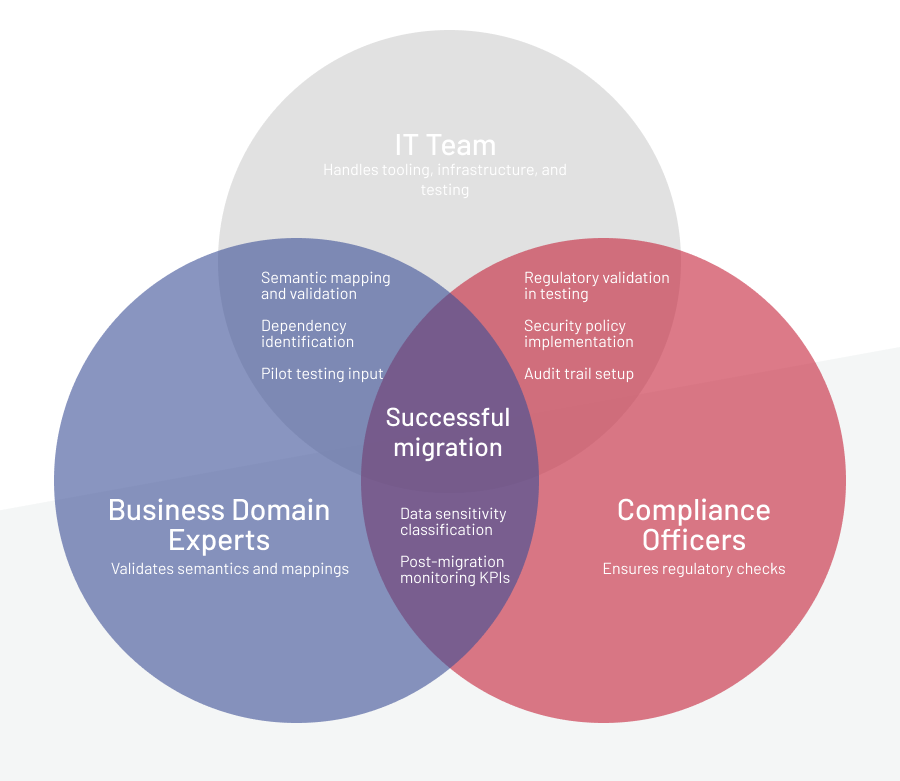
Tip 3: Define clear ownership and communication models
Assign responsibility for architecture, migration execution, DevOps, QA, integrations, and business continuity. During cutover, use a central coordination model with short communication loops.
-
Tip 4: Prepare a rollback and disaster recovery plan
Every migration wave needs a predefined rollback path. This requires database snapshots, configuration restore points, routing controls, and the ability to reinstate legacy paths without data loss, which is a critical safeguard in any legacy system migration.
-
Tip 5: Define and monitor performance metrics
Track p95/p99 latency, throughput, error rate, queue depth, database latency, and cron job duration. Compare all values to the established baseline to detect regression early.
-
Tip 6: Train teams on cloud behavior
Teams should understand how cloud runtime changes the way systems behave under load. Network variability, distributed components, and stricter timeout behavior require different diagnostic habits and decision-making compared to on-premises systems. Giving teams this context early leads to faster root-cause analysis and more stable rollout phases.
Getting everyone aligned is important, but the effectiveness of the technical work is what ultimately determines how reliably each migration wave performs.
If you’re preparing for a cloud move for your SAP Commerce setup, explore our step-by-step guide to SAP Commerce Cloud readiness and risk reduction.
Download WhitepaperTechnical Measures to Minimize Migration Risks
From a technical standpoint, migration is far more stable when the system is prepared for cloud execution patterns in advance. Many performance and consistency issues can be avoided if teams treat this phase as an opportunity to remove brittle logic, reduce data volume, strengthen data integrity, eliminating the number of unknowns that surface during cutover and coexistence. The recommendations below focus on technical measures that limit risk and improve stability as real cloud conditions come into play.
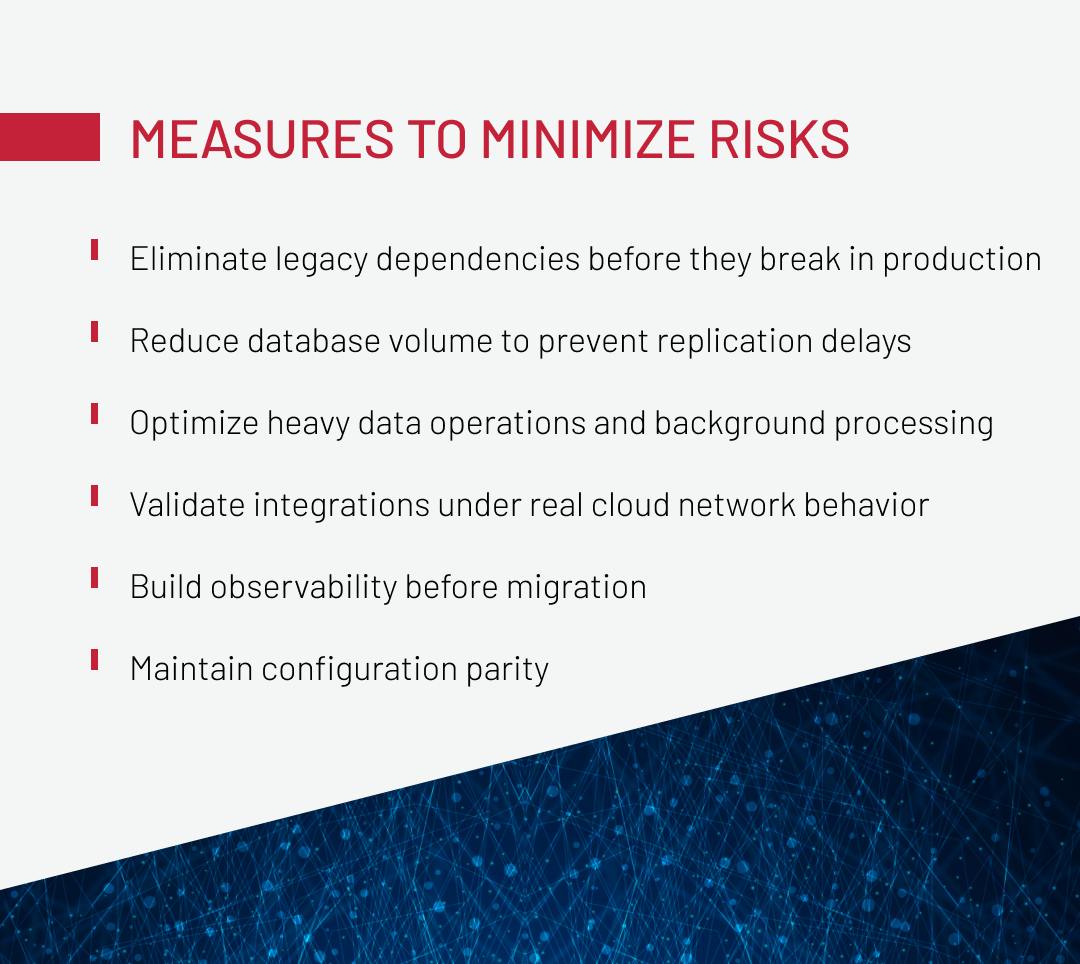
Eliminate legacy dependencies before they break in production
Hardcoded paths, platform-dependent shortcuts, and environment-specific logic that worked on-premise may fail unpredictably in cloud environments. These constructs cause post-migration failures that are difficult to diagnose and expensive to fix under production load.
Review the codebase for legacy constructs before migration starts. Decouple tightly connected modules — pricing, imports, promotions, and integrations — so they can operate reliably under distributed cloud conditions. During a telecom project migration, we used SonarQube static analysis to catch deprecated components and hidden dependencies that would have caused failures in the cloud environment. Without that upfront cleanup, those issues would have surfaced post-go-live under production load, forcing emergency refactoring.
Reduce database volume to prevent replication delays
Database migration risks may stem from bloated databases with years of historical data, which increases migration time, cloud storage costs, and replication load. Unoptimized indexes and oversized table structures amplify these problems, causing degraded performance.
Evaluate database size and structure before the move. For a global jewelry retailer, archiving historical data and optimizing database structures before migration reduced replication lag and stabilized database behavior during early cloud testing. As a result, the streamlined database maintained consistent throughput and avoided the performance regressions observed in the initial migration attempts.
Optimize heavy data operations and background processing for cloud execution
Operations that ran overnight or off-peak on-premises, such as full imports, large reindexing jobs, and batch updates, often behave very differently in the cloud. When these processes are not adapted, they compete with user traffic for shared resources and introduce cascading delays that only become visible under real load.
Before migration, review all heavy and background operations as a single class of workload. Replace full imports with delta-based updates where possible, reduce the scope of reindexing and batch processing, and eliminate unnecessary work inside scheduled jobs. Revisit execution schedules so long-running tasks do not overlap with peak traffic, and ensure queries and processing logic are efficient rather than simply shorter. The goal is not to eliminate background processing, but to make it predictable, resource-aware, and safe to run alongside customer-facing activity.
Validate integrations under real cloud network behavior
Integration failures often surface only after migration, when existing timeout, retry, and error-handling assumptions no longer hold under production traffic. For example, during a platform migration, a beauty retailer discovered that payment provider timeouts increased under cloud latency, causing checkout failures during peak traffic.
To avoid this, revalidate all integrations using cloud-relevant latency, timeout, and retry settings before migration. Test with production payload sizes and introduce network latency to simulate real conditions.
Build observability before migration to enable fast diagnosis when issues appear
If observability isn’t in place before the move, performance drops, errors, and slow background jobs stay invisible until customers start noticing. And instead of troubleshooting, the team ends up scrambling to set up monitoring in the middle of an incident — the worst possible time to do it.
Before shifting any workload to the cloud, make sure logging, metrics, and tracing are already working end to end. Track the signals that show when something is drifting: p95/p99 latency, queue depth, job and sync durations, slow queries, or unusual cache behavior. Tools like Datadog, Grafana, APM, or Kibana make this easy once alerts are configured around the right thresholds.
Observability becomes even more powerful when paired with a baseline. Capture performance before migration and compare everything against it during coexistence, cutover, and the first weeks afterward. That baseline helps you see gradual degradation early, while changes are still contained and fixes are simpler.
Maintain configuration parity to prevent cross-environment failures
When application behavior depends on settings, defaults, or infrastructure characteristics that differ between environments, issues remain hidden during testing and emerge only after cutover.
To avoid that, keep configurations aligned across environments so pre-production behaves as close to production as possible. Don’t rely on inherited on-premises assumptions, and document any differences that truly can’t be avoided. Then, validate behavior under production-like conditions to make sure configuration drift doesn’t turn into runtime failures during migration.
Align cache layers to avoid stale data and inconsistent states
Cache invalidation rules that relied on tightly coupled deployment and shared runtime assumptions often break down when cache layers operate more independently in cloud-based architectures. Stale entries can show the wrong price, outdated inventory, or old promotions, which hurts both revenue and customer trust. And when you have several cache layers that aren’t coordinated, you end up with inconsistent data that’s hard to track down.
Bring your front-end, middleware, and back-end caches under the same invalidation rules. In high-traffic ecommerce, a reliable caching strategy depends on clearing data consistently across all layers so customers don’t end up seeing outdated information.
Get the whitepaper to learn how cache misuse affects ecommerce performance and get practical ways to prevent it.
After outlining the technical groundwork, the focus moves to how performance is tracked and evaluated throughout the migration.
Performance Control: Metrics and Stages
Keeping performance steady during a migration starts with knowing your baseline and watching the system closely at every stage. Cloud setups come with their own latency patterns, load behavior, and failure scenarios compared to on-premises systems, so teams need a clear process for understanding how everything behaves before, during, and after the move. A solid set of metrics and checkpoints makes it easier to spot problems early and confirm that the system stays reliable as workloads shift.
Key metrics to monitor include:
-
Response time (p95/p99) for PDP, PLP, search, checkout, and integration-driven flows:
reveals whether customer-facing operations degrade under real traffic. Increased latency directly impacts conversion rates and indicates bottlenecks in retrieval paths, queries, or integration calls.
-
Processing lag across asynchronous operations, such as indexing, syncing, and queue-driven tasks:
shows whether background operations are keeping pace with data changes. Growing latency signals resource contention or inefficient processing that will eventually affect data freshness and system responsiveness.
-
Throughput for orders, imports, indexing jobs, and synchronization processes:
indicates system capacity under load. Declining throughput means the system can't handle peak traffic or data volumes, leading to delays and operational backlogs.
-
Error and timeout rates, especially in ERP, CRM, payment, tax, and other external integrations:
exposes integration failures that prevent transactions from completing. Rising error rates indicate network issues, timeout misconfigurations, or API incompatibilities that need immediate correction.
-
Background processing metrics, including cron duration, queue depth, and reindexing time:
tracks whether scheduled jobs complete on time without blocking other operations. Queue buildup or extended job duration signals resource exhaustion or poor optimization.
To make monitoring even more effective, you need to keep in mind that performance must be controlled at several points throughout the migration:
-
1
Before migration: establish baseline
A baseline provides the reference needed to identify regression once workloads move to the cloud.
-
2
During migration: live monitoring
Hybrid operation often produces duplicate traffic, sync congestion, and variability in data load. Monitoring during this stage is critical for identifying where cloud and legacy components behave differently.
-
3
Cutover period: intensified monitoring
The initial hours after redirecting traffic typically reveal the most immediate performance issues, as caches warm and new dependency paths are exercised for the first time.
-
4
First 1–4 weeks after migration: critical observation window
Real traffic patterns during this window often expose issues that staging cannot reproduce. Continuous monitoring is necessary to detect these conditions quickly.
And to provide the full motoring picture, we can’t avoid mentioning the required tooling:
- Application performance monitoring (APM) tools like Datadog, New Relic, or Dynatrace for real-time visibility
- Dashboards tracking latency, throughput, and error rates across all critical operations
- Centralized logging systems, such as Kibana or Splunk, for error correlation and root cause analysis
- Distributed tracing for complex multi-step operations to identify where delays occur
- Dedicated monitoring for external integrations, including ERP, CRM, payment, tax, and PIM systems
This level of visibility makes it possible to validate system behavior against the baseline and respond promptly to any deviations.
Clear performance metrics are useful only if the system is prepared for measurement. That preparation starts before the migration itself and should be part of the migration plan from the beginning.
Pre-Migration Performance Checklist
A migration checklist works best when it helps teams surface hidden assumptions and performance risks before cloud runtime conditions are introduced. The questions below focus on areas where issues most often emerge after cutover and are intended to be reviewed before any workload moves to the cloud.
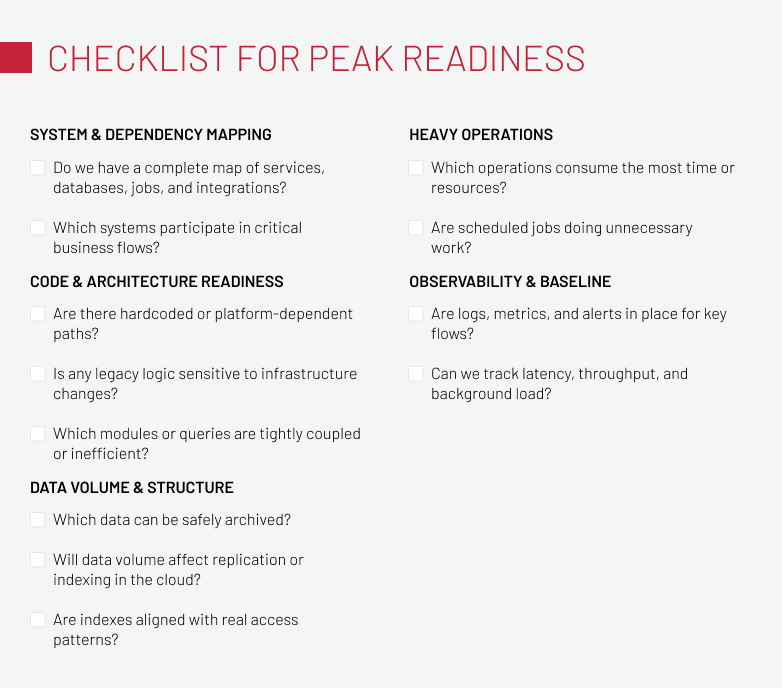
Inventory all applications, systems, and dependencies:
- Do we have a complete map of all microservices, database tables, imports, cron flows, internal APIs, and external integrations?
- Which systems exchange data during critical business flows such as checkout, order processing, indexing, or synchronization?
- Where do cloud and legacy components need to coexist, and for how long?
Review codebase and architecture readiness:
- Are there hardcoded paths or platform shortcuts in the codebase?
- Have we reviewed legacy logic that could behave unpredictably once infrastructure constraints change?
- Which queries or modules are known to be inefficient or tightly coupled?
Assess data volume and database structures:
- Which records can be archived without affecting active processes?
- Are database indexes aligned with current access patterns and critical queries?
- How will data volume affect replication, indexing, and synchronization once the system runs in the cloud?
Prepare heavy operations for cloud execution:
- Which operations currently take the most time to complete?
- Are scheduled jobs optimized for efficiency, or do they include unnecessary processing that increases load?
- Do any heavy tasks overlap with peak user activity?
Establish observability and baseline metrics:
- Do we have logs, metrics, alerts, and dashboards in place for all critical flows?
- Which metrics represent the baseline for performance evaluation?
- Can we reliably monitor response time, throughput, background processing, and database behavior?
These questions will help you surface potential issues early, minimizing performance risks during cloud migration.
To Sum Up
Migration issues rarely come from a single failure. They accumulate through small gaps: slow background jobs that no one optimized, integration timeouts hidden by fast on-premise networks, database structures built for different load patterns. Once cloud runtime conditions are introduced, these gaps compound quickly.
Organizations that succeed don’t just catalog migration risks and benefits in a spreadsheet. They baseline performance before anything moves, refactor code to remove legacy dependencies, and build observability to catch degradation early. After all, always keep in mind that migration isn’t something you optimize after go-live — it’s something you design for from the start.
If you’re planning a migration, Expert Soft can help you approach it with the technical rigor it requires. Let’s talk.
Andreas Kozachenko is the Head of Technology Strategy and Solutions at Expert Soft, focusing on enterprise-scale transformations. His experience with data and cloud migrations helps teams anticipate risks while protecting performance and business continuity.
New articles

See more

See more

See more

See more

See more