
Do's and Don'ts of Caching Large Data Sets in SAP Commerce

Every second of delay costs big money in ecommerce. Research from Portent shows that a site loading in 1 second has a conversion rate 3x higher than one loading in 5 seconds. For high-load platforms running SAP Commerce Cloud with massive product catalogs and complex integrations, the caching strategy is one of those factors that determines whether you meet your performance targets or fall short.
The caching choices you make won’t define scalability on their own, but they do play a decisive role in whether your platform absorbs load spikes smoothly or starts showing strain when traffic surges.
Offering Expert Soft’s clients ecommerce development and support services, our experts know firsthand how one caching layer can make or break performance. I gathered those caching strategies that hold up in production under large datasets and complex integrations, relevant for enterprise platforms handling thousands of transactions per second across various high-volume SAP Commerce implementations.
Quick Tips for Busy People
Here is a brief overview of key points to remember:
- Key sources of latency: common bottlenecks with large datasets arise due to repeated lookups, layered computations, slow integrations, or static dependencies hidden inside dynamic flows.
- High-impact caching zones: caching delivers the strongest gains at aggregation layers, integration boundaries, and edge delivery points where load concentrates.
- High-value cached artifacts: composite responses, stable page fragments, internal lookup structures, and long-lived configuration data remove significant redundant work.
- Freshness and reliability mechanisms: business-triggered invalidation, well-tuned TTLs, and active monitoring keep cached content accurate as conditions change.
- Common failure patterns: systems often run into trouble when cache layers fall out of sync, supporting data ages silently, or error responses end up stored.
- Low-return caching targets: caching rarely accessed items, legacy rule sets, or rigid time-based expirations usually add overhead without meaningful benefit.
- Core architectural trade-offs: scaling caching effectively requires balancing performance gains with consistency, architectural alignment, and ongoing maintenance capacity.
- Readiness fundamentals: a solid foundation comes from understanding hotspots, defining clear invalidation flows, maintaining strong monitoring, and coordinating cache layers.
Let’s move into the specific do’s and don’ts of caching large data sets.
Common Bottlenecks with Large Datasets in High-Load Platforms
Before diving into specific practices, let’s pinpoint the performance issues in high-load ecommerce platforms that most often can be resolved through effective caching. Understanding these bottlenecks helps you target caching strategically rather than throwing it everywhere and hoping something sticks.
-

Expensive and repetitive database queries
In high-load ecommerce systems, large datasets and complex data relationships naturally push the platform toward frequent lookups for products, categories, pricing, stock, and CMS content. As datasets grow, those lookups become a major source of latency. When database operations emerge as the slowest part of the request cycle, caching the high-read, low-change data delivers the greatest performance gains.
-

Heavy computation for frequently accessed data
Some bottlenecks appear even when the database isn't the issue. Product pages, category listings, and attribute-heavy displays require assembling layered data structures and running the same computations over and over. As traffic grows, these repeated calculations slow everything down. Capturing the final computed structures in cache eliminates the need to rebuild them for every request.
-

High latency from remote systems or microservices
Ecommerce stacks often depend on pricing services, inventory endpoints, recommendation engines, or various microservices if a system relies on a microservices approach. When one of these components starts responding slowly, the whole platform can feel it. Strategic caching of stable or predictable responses reduces the frequency of external calls, keeping the storefront responsive even when a downstream system is under strain.
-

High traffic on endpoints that return similar or identical responses
Some parts of the storefront, such as category pages, navigation menus, or homepage components, serve nearly identical data to thousands of users. Cached responses let these endpoints operate at scale without unnecessary rendering or aggregation work.
These bottlenecks can be addressed with caching, but only when caching is configured correctly. Poorly implemented caching actually makes problems worse by adding layers of complexity, creating data inconsistencies, and consuming resources without delivering performance gains. To avoid that, let’s look at the caching practices that actually work at scale.
Do’s of Caching Large Data
Although each client project reveals that identical caching approaches can behave differently in real systems, there are several practices we consistently begin with.
Target caching at aggregation-heavy layers
As we see, the biggest wins appear where multiple systems converge. In SAP Commerce setups, that’s usually the facade or middleware layer, where product data meets ERP pricing, external inventory systems, and CMS content before being shaped into a final response.
Caching at this layer removes the heavy lifting from every request. Instead of reassembling data from several sources, the platform can return a pre-built response in milliseconds. That’s the difference between scaling seamlessly through a promotion and scrambling to stabilize APIs under load. It also stabilizes integrations that would otherwise be hammered with identical requests, protecting downstream systems and reducing operational firefighting.
-
Pro tip:
Tie cache refreshes to business events rather than technical triggers: promo launches, content updates, price changes. This keeps aggregated data accurate without constant invalidation and ensures the cache reflects what the business needs users to see in real time.
Cache composite data instead of rebuilding it
Once data has already been enriched: product information merged with pricing rules, inventory signals, personalization inputs, or promotion logic, you’re no longer dealing with raw fragments. You’re holding a finished artifact that the system invested real effort to produce. Recomputing that artifact on every request burns CPU cycles, increases latency, and forces downstream services to repeat work they’ve already done.
This is where dynamic content caching shows its value, as you can store responses that already carry combined business logic. These responses typically reflect exactly what the user needs to see at that moment: a product with availability applied, a price after rules and customer context, or a category page after filters and personalization.
The distinction matters. Aggregation-layer caching is about placement, choosing the architectural layer that shields the system from heavy cross-service calls. Composite-response caching is about choosing the type of artifact that removes the most redundant computation across the entire flow.
-
Pro tip:
Prioritize caching responses that already include multi-source transformations. They carry the highest computational cost to reproduce and deliver the strongest performance gains when served from cache.
Break complex pages into cacheable blocks
Not all ecommerce pages operate as a single entity. Many of them are composites of data with completely different lifecycles: some elements barely change, while others update constantly because of inventory, pricing rules, personalization, or promotions. If you treat the whole page as one cacheable object, you’re forced into extremes: either cache everything and risk staleness, or disable caching and lose performance where it matters most.
A more scalable pattern is to decompose pages into cacheable blocks and choose suitable caching strategies for each. This approach reduces load across services and keeps dynamic information accurate without dragging down the entire page.
A product detail page (PDP) illustrates this well. On a platform that offers medical equipment, block-level caching was essential because the PDP combined long-lived data (descriptions, specifications) with fast-changing elements (availability, pricing, recommendations). To accelerate variant retrieval, we also used Apache Solr as a high-speed lookup layer alongside standard component caching. With both strategies combined, the page ultimately ran 8× faster, and the system stayed stable during traffic spikes.
-
Pro tip:
For SSR architectures, tools like Next.js middleware, Express, or Varnish with ESI let you stitch together cached and dynamic fragments cleanly.
Let’s talk about strategies that work in production and can help your platform scale without breaking.
Share Your RequestOffload stable content delivery to the edge
Not every piece of an ecommerce page deserves a round trip to your servers. For example, CMS blocks and static product attributes that barely change, yet compete for back-end capacity alongside dynamic content. That’s wasted infrastructure and unnecessary latency.
Edge caching shifts this load away from SAP Commerce and closer to the user. When stable content is served directly from the CDN, your core systems stay focused on the parts of the experience that truly require real-time accuracy. This separation becomes essential at scale: users get faster pages, and your back-end avoids being overwhelmed by thousands of identical requests during peak campaigns.
Dynamic values, such as pricing, stock, or personalized elements, should be handled differently. They update frequently and must stay fresh, but they represent only a fraction of the total page weight. Fetching these smaller pieces on demand keeps the user experience accurate without forcing the entire page to bypass the edge cache.
For businesses running large catalogs or multiple regional storefronts, this approach has a measurable impact: lower infrastructure costs, more predictable performance during traffic surges, and fewer risks tied to backend slowdowns.
-
Pro tip:
Configure your CDN to cache static page structure while excluding dynamic blocks. Implement ESI or client-side fetching for values that change frequently.
Cache internal lookup data used in dynamic flows
Some of the heaviest performance issues hide inside flows that look fully dynamic on the surface. Pricing updates, cart recalculations, personalization logic — all of these seem like real-time operations. But digging deeper, you can find static dependencies being recomputed on every request: category trees, attribute maps, localization bundles, static rule sets.
Because these calculations happen inside dynamic flows, teams often treat the whole chain as dynamic and skip caching entirely. Caching these internal lookup structures removes the hidden overhead that slows down add-to-cart, search filters, pricing checks, and other high-traffic operations. While this doesn’t compromise freshness, because the truly dynamic elements remain dynamic.
-
Pro tip:
Trace your dynamic flows and mark every static structure they rely on if it recomputes the same shape repeatedly, lift it into cache.
Persist rarely changing configuration data
Configuration data like tax rules, shipping methods, payment options, and regional settings rarely change, but get accessed constantly. Fetching this data from the database on every request adds unnecessary latency and database load.
The solution is caching this configuration data with long TTLs and invalidating it when changes actually occur. For high-load platforms, this can reduce database queries without any risk of serving stale data, because you’re in control of when the configuration changes.
-
Pro tip:
Identify configuration data that changes on a business-driven schedule rather than continuously. Implement caching with TTLs measured in hours or days, depending on your update frequency.
Monitor cache behavior to sustain performance
Caching isn’t a “set it and forget it” mechanism — it drifts. Without monitoring, you risk discovering caching issues only after they become visible to users or impact revenue.
A global ecommerce project for a beauty retail platform illustrated this clearly. During a major promotion, the storefront continued showing an outdated banner because one CMS component was cached more aggressively than intended. Because no one was watching freshness metrics, the issue surfaced only when the business needed the update the most. A quick configuration fix resolved it, reminding that even effective caching strategies fail if their behavior isn’t observed.
-
Pro tip:
Track cache hit ratios over time. Sudden drops are one of the most reliable early indicators that an otherwise effective caching strategy is starting to slip out of alignment.
Don’ts of Caching Large Data
Most caching failures accumulate as technical debt: cache layers that fell out of sync during a migration, invalidation logic that made sense two architectures ago, or monitoring gaps that let performance degrade incrementally. These anti-patterns share a common thread: they worked fine at a lower scale or in simpler architectures, then became liabilities as complexity increased. Recognizing and addressing them early prevents performance bottlenecks from becoming embedded in your architecture.
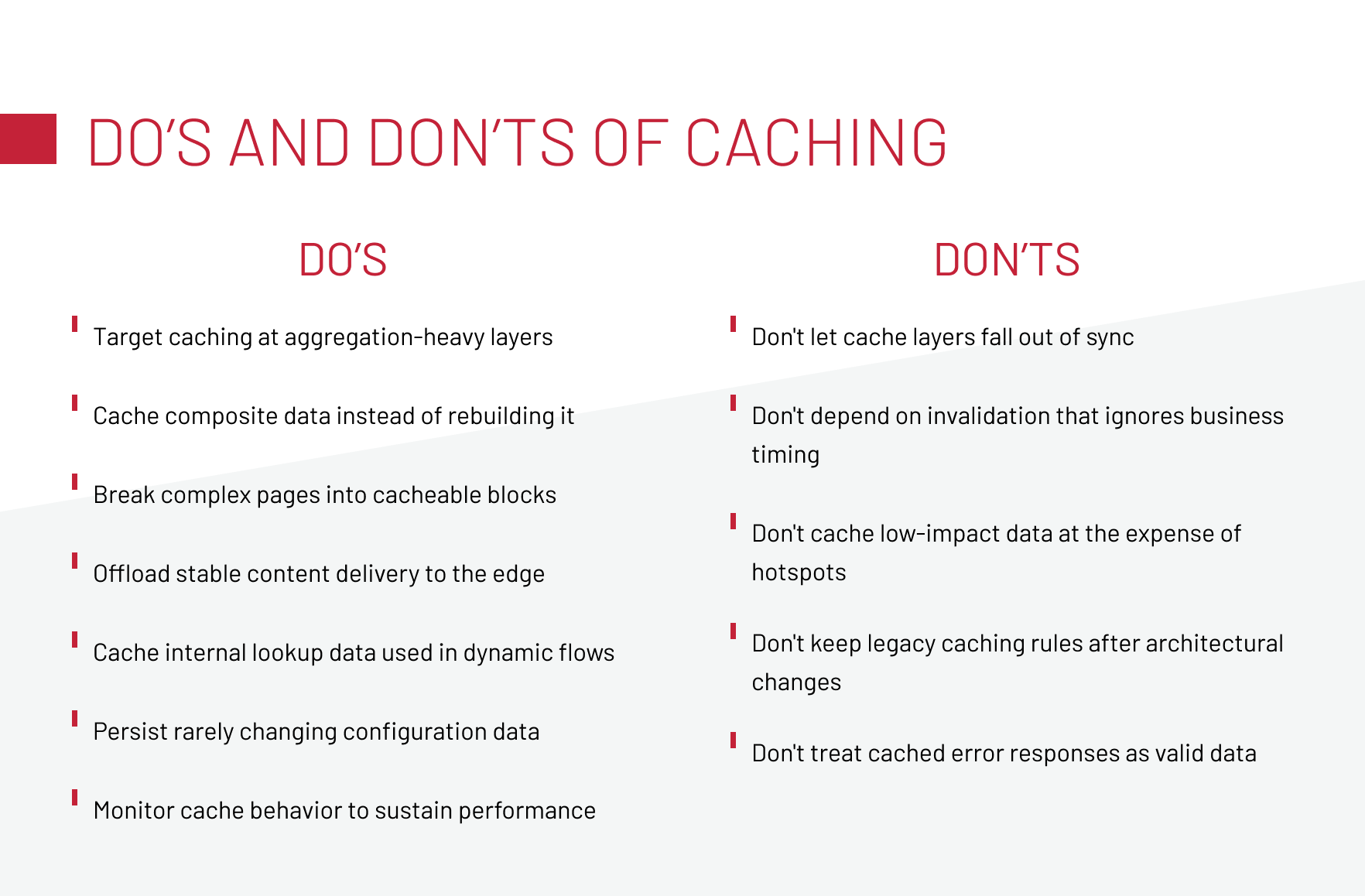
Don’t let cache layers fall out of sync
Multi-layer caching boosts performance, but it also creates room for inconsistency. When CDN, front-end, middleware, and SAP Commerce caches stop aligning, users receive incorrect info, which damages trust and conversions.
We saw this on a beauty retail platform where five cache layers drifted, causing product data conflicts. Another case appeared during a Spartacus migration: SAP back-office, Spartacus, and Node.js caches updated on different schedules, resulting in stale content until we implemented coordinated invalidation across all layers.
- Map all caching layers and their invalidation triggers.
- Implement coordinated cache clears across layers when source data changes.
- Monitor for inconsistencies using automated cross-layer data checks.
Download our whitepaper examining common caching mistakes and their performance impact, with strategies for avoiding them.
Don’t depend on invalidation that ignores business timing
Cache invalidation that relies on fixed time intervals creates a disconnect between your system behavior and business operations. The problem compounds during peak sales events. In high-traffic scenarios, time-based invalidation either clears caches too frequently, wasting the performance benefits you’re trying to achieve, or not frequently enough, serving stale data. Neither option serves the business well.
The correct approach ties invalidation to actual business events. When inventory changes, prices update, or promotions activate, those events should trigger cache invalidation immediately. This ensures your cached data reflects business reality rather than arbitrary technical schedules.
- To avoid such caching pitfalls, implement event-driven cache invalidation that responds to business operations. In SAP Commerce, this often means leveraging the platform’s interceptor framework or event system to trigger cache clears when relevant data changes.
- For external systems, implement webhooks or message queues that notify your caching layer when updates occur.
Don’t cache low-impact data at the expense of hotspots
Caching everything may feel thorough, but it wastes memory and effort. In high-load systems, most traffic concentrates on a small set of hotspots: top products, category pages, navigation, and homepage blocks. Treating rarely accessed items the same way means your cache fills with data that’s rarely reused, while the areas that actually drive load and revenue don’t get the attention they need.
- Analyze your traffic patterns to identify genuine hotspots: the pages, API endpoints, and data that get accessed repeatedly.
- Implement tiered caching where high-traffic items get aggressive caching with large allocations, medium-traffic items get moderate caching, and low-traffic items use minimal or no caching.
- Monitor cache hit ratios per data type and adjust your strategy based on actual reuse patterns.
Don’t keep legacy caching rules after architectural changes
Caching configurations that made sense in your previous setup can cause unexpected behavior after migrations or refactoring.
For example, when migrating a platform to headless architecture, the caching logic designed for the old setup didn’t translate directly. Some rules became redundant because the new architecture handled caching differently. Others created problems because they conflicted with the new system’s native caching mechanisms.
- Document which caching rules exist, why they were implemented, and which architectural assumptions they depend on.
- Remove caching configurations that are no longer relevant and ensure new team members understand the current caching strategy through clear documentation.
Check out our whitepaper on integration-ready ecommerce architecture for strategies that scale.
Don’t treat cached error responses as valid data
Error responses can get cached unintentionally, and the consequences are worse than performance issues because users see errors repeatedly even after the underlying problem is fixed. It creates a perception of unreliability that outlasts the actual technical issue.
Another version of this problem involves partial failures. A product listing might return successfully, but with missing data from a failed integration. If that incomplete response gets cached, users see products with missing prices or images, and the cache prevents the system from trying again to fetch the complete data.
- Implement negative caching with special handling.
- Configure your caching layer to recognize error responses by status code and either avoid caching them entirely or cache them with very short TTLs.
- For responses that might contain partial data due to integration failures, implement validation that checks for completeness before caching.
Navigating Caching Trade-Offs in Evolving High-Load Architectures
Caching strategies evolve with platform complexity. What works at 10,000 requests per hour can break at 100,000. Migration from monolithic to microservices or headless architectures invalidates previous caching assumptions. Three core trade-offs determine whether your caching strategy scales or becomes a maintenance burden.
These trade-offs shape how well your caching strategy holds up as your platform grows. Before committing to any approach, it’s worth checking whether your system and your team are actually prepared to operate caching at the level your architecture demands.
Caching Readiness Checklist for Large-Data Platforms
Before implementing or revising your caching strategy, run through this readiness checklist. Ask yourself:
- Do we clearly know which endpoints, pages, and API calls receive the highest traffic and which are low-value?
- Is our invalidation strategy tied to real business events rather than time-based expirations?
- Do we have monitoring that tracks hit/miss ratios, TTL behavior, cache size, and anomalies in real time?
- Have we tested how multiple cache layers behave during invalidation and what happens when layers fall out of sync?
- Is error handling configured so that temporary failures aren’t cached and repeatedly served to users?
- Have we mapped all static or semi-static dependencies used by dynamic flows—and ensured their invalidation is coordinated?
- Do we regularly review whether our caching strategy still matches current traffic patterns, data volume, and architectural complexity?
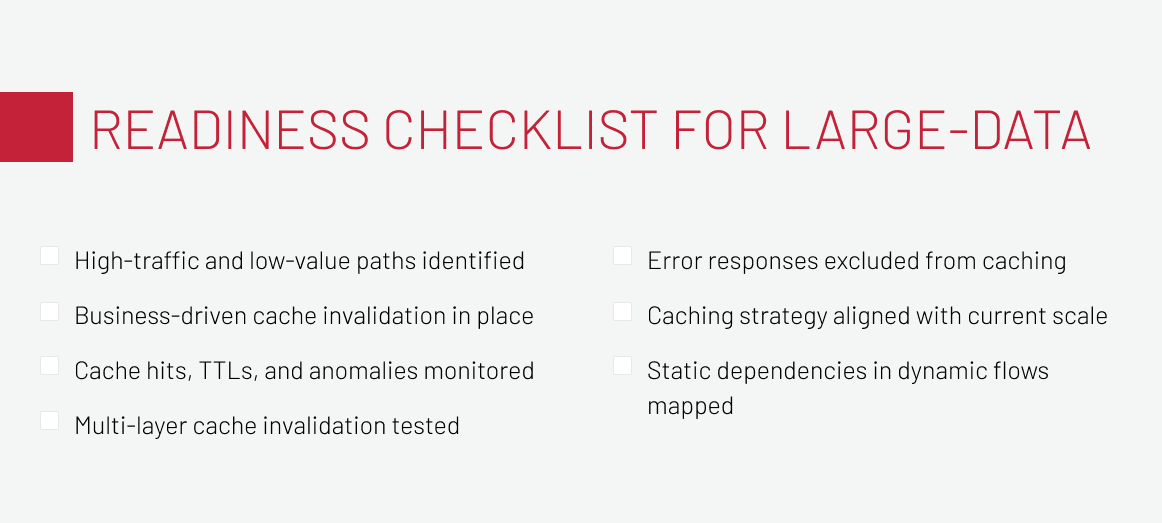
While these questions won’t eliminate every issue, they help avoid the fundamental ones and ensure caching works for you, not against you.
Let’s Summarize
Caching large datasets in high-load SAP Commerce platforms works when it reflects how the system actually operates: where data is combined, which flows repeat the same work, and which components users hit at scale. The practices in this article highlight how to keep responses fast, integrations stable, and dynamic flows efficient by placing caching where it delivers the most impact and avoiding patterns that quietly introduce inconsistency or overhead.
As architectures evolve and traffic grows, the effectiveness of your caching strategy depends on continuous review, from aggregation layers and component caching to edge delivery and caching to improve microservices performance. Strong monitoring, clear invalidation rules, and alignment with real usage patterns keep caching predictable and reliable, ensuring your platform stays responsive during peak demand and resilient as complexity increases.
If you’re reviewing your caching approach or planning architectural changes, we’re happy to share what has worked in similar high-load environments. Feel free to reach out.
Known for his strategic oversight of SAP Commerce projects, Andreas Kozachenko, Head of Technology Strategy and Solutions at Expert Soft, shares expert perspectives on caching large data sets efficiently while avoiding common performance pitfalls.
New articles

See more

See more

See more

See more

See more